Architecture of the Archive Browser
To give you instant access to years of historical data without impacting your production environment, the Archive Browser utilizes a decoupled, high-performance architecture. It acts strictly as a viewer and search engine for the ASCII text files that have already been produced by the AE DB Archive utility.
By completely separating the search index from the Automation Engine, this architecture ensures that executing heavy historical searches puts zero computational load on your live database.
The Data Flow
This diagram illustrates the Archive Browser architecture:
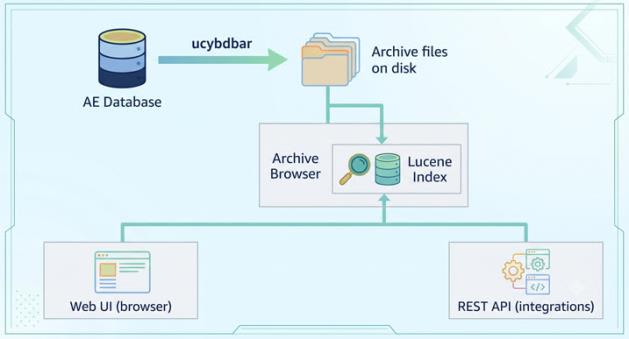
Te Archive Browser follows a straightforward, three-step data flow from your live database to the end-user:
-
Data Export
First, the AE DB Archive utility (ucybdbar) extracts the historical data from your live AE database. The utility converts and saves this data as semicolon-delimited ASCII text files into a designated folder on your file system.
-
Indexing
The Archive Browser continuously monitors this dedicated file folder. When it detects the exported files, it automatically builds an embedded Apache Lucene full-text search index. This index updates automatically whenever new archive files appear in the directory.
-
Access
Finally, the indexed data is made available for querying. You can access the data visually through the Web UI in your browser, or programmatically via the REST API for custom integrations.
Because the index is fully embedded within the Archive Browser, you can filter, sort, and retrieve millions of archived records in milliseconds. No connection to the AE system is required at query time, guaranteeing that your historical audits never slow down your daily automation tasks.
See also: