Configuring Firewall and Ports
Automic Automation requires you to have a small set of inbound and outbound TCP ports open. All port assignments are configurable and can be changed in the configuration file of the components.
Since the components are distributed in different network areas, the following lists can help you with the port configuration. The graphics included in this page depict the network connections for the corresponding network area and provide the default port numbers.
This page includes the following:
Work Processes (WPs) Ports
While Communication Processes (CPs) have an outbound connection, WPs must not be exposed to the outside and should be protected by a firewall.
Communication between all WPs and CPs ( WP <-> PWP/JWP/CP/JCP):
-
Port for Primary Work Process as defined in PWPPORT (2270 TCP)
-
Ports for Java Work Processes as defined in JWP.SYNC.PORTS (2271-2279 TCP)
-
Ports for Communication Processes as defined in CP.PORTS (2217-2221 TCP)
-
Ports for Java Communication Processes as defined in JCP.PORTS (2317 TCP)
Inbound Ports (Automation Engine)
For internal communication purposes, each server process needs a unique port in the AE. The settings for CP.PORTS JCP.PORTS and JWP.SYNC.PORTS in the [PORTS] section of the AE INI (ucsrv.ini) file have to be chosen so that each process can use an AE-system wide unique port.
-
Port for JCP process WS 8443 - 8445 as defined in WS.PORT
Communication between JCP and the TLS/SSL Agents, the TLS Gateway, the TLS/SSL Client Proxy, the Automic Web Interface, the Application Interface, and Java Call APIs.
-
Ports for CP processes 2217-2221 TCP or CP
Communication between CPs and non-TLS/SSL Agents. This port range is also used for OS Call APIs and for the CP port of the TLS Gateway, when the TLS Gateway substitutes physical CPs.
-
Port for Service Manager 8871 TCP
Communication between CP, Service Manager Dialog, Service Manager CLI, and the Service Manager.
-
Ports for REST process HTTP 8088 as defined in PORT
Communication between REST and Automic Web Interface or other REST clients.
When the JCP and the REST processes are initiated, they bind to the ports you have defined in the JCP.PORTS parameter in the [PORTS] section of the AE INI file.
Important! If you use JCP and REST processes, make sure you define the corresponding number of ports in the JCP.PORTS parameter. Otherwise, not all processes can establish the connection.
If there are no ports defined in the JCP.PORTS parameter in the [PORTS] section of the AE INI file, the JCP and REST processes bind randomly to another port, which is necessary for the internal communication between WP and JCP/CP or REST process. When the JCP/REST start, they open a random port and send it internally via the database to the WPs so that WPs can reach the JCPs/CPs and/or REST process.
Additionally, the JCP binds to a second port: the WS.PORT which is configurable in the INI file and is used by the Agents to communicate with the JCP. For more information, see Automation Engine INI file.
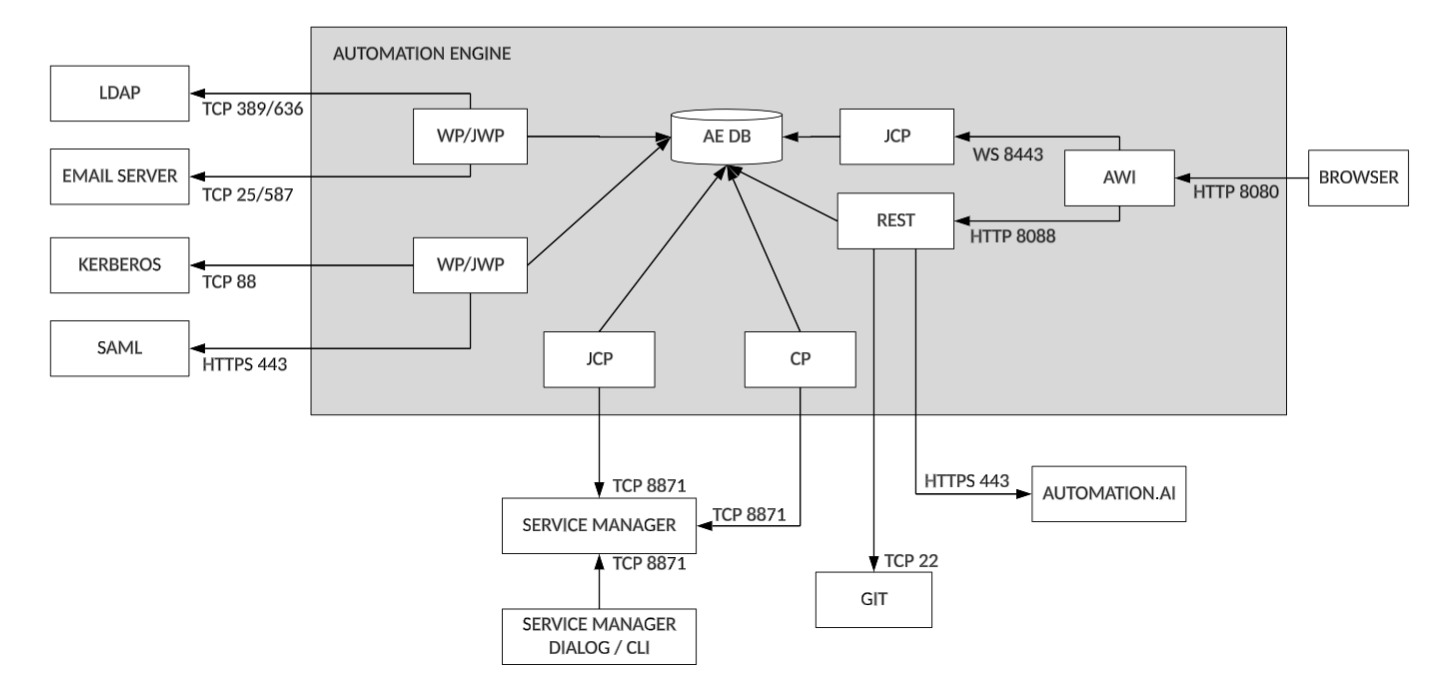
Outbound Ports
Automation Engine
Click the image to expand it.
-
Port for the e-mail server 25/587 TCP
Communication between WP and the e-mail server
-
Port for Git 22 TCP
Communication between REST and Git
-
Port for Automation.AI HTTPS 443
Communication between REST and the Automation.AI component
-
Port for LDAP 389/636 TCP
Communication between WP/JWP and LDAP
-
Port for Kerberos 88 TCP
Communication between the WP/JWP and Kerberos
-
Port for Service Manager 8871 TCP
Communication between the CP/JCP and the Service Manager as well as the Service Manager clients (Dialog and CLI) and the Service Manager.
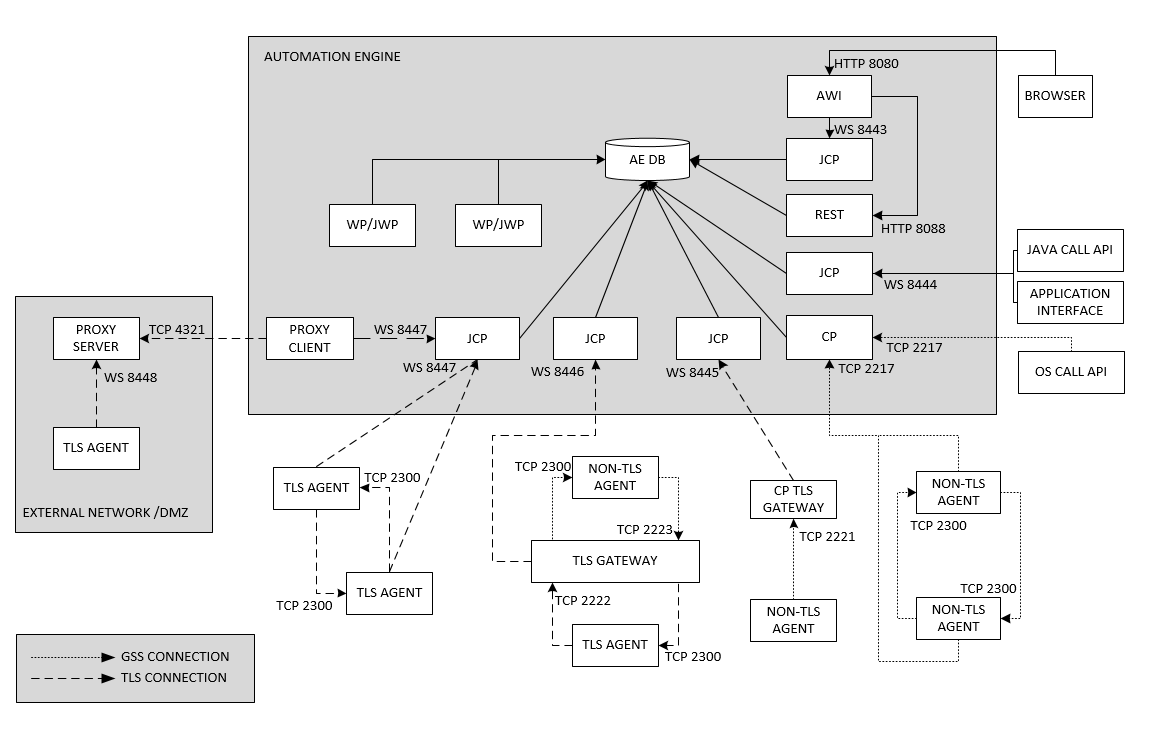
Agents and Proxy
Click the image to expand it.
-
Ports for the connection to the Automation Engine Server (on the Automation Engine system) WS 8443 - 8445 TCP for TLS/SSL Agents and TLS Gateway instances.
-
Ports for the connection to the Automation Engine Server (on the Automation Engine system) 2217-2221 TCP
Communication between CPs and non-TLS/SSL Agents.
-
Port for the connection to the CP port in the TLS Gateway 2221 TCP
Communication between a non-TLS/SSL Agent and the CP Port in the TLS Gateway
-
Port for direct file transfers between two non-TLS/SSL or two TLS/SSL Agents (on the system where the Agent is installed) 2300 TCP
It can be changed in the configuration files. For details on file transfers refer to the INI configuration page of the Agent Windows 64-bit.
-
Port for file transfer via TLS Gateway from a non-TLS/SSL to a TLS/SSL Agent 2223 TCP
-
Port for file transfer via TLS Gateway from a TLS/SSL to a non-TLS/SSL Agent 2222 TCP
-
Port for the Client Proxy 4321 TCP
Communication between the Server and the Client Proxy.
-
Port for the Server Proxy WS 8443 +
Communication between the Agent and the Server Proxy.
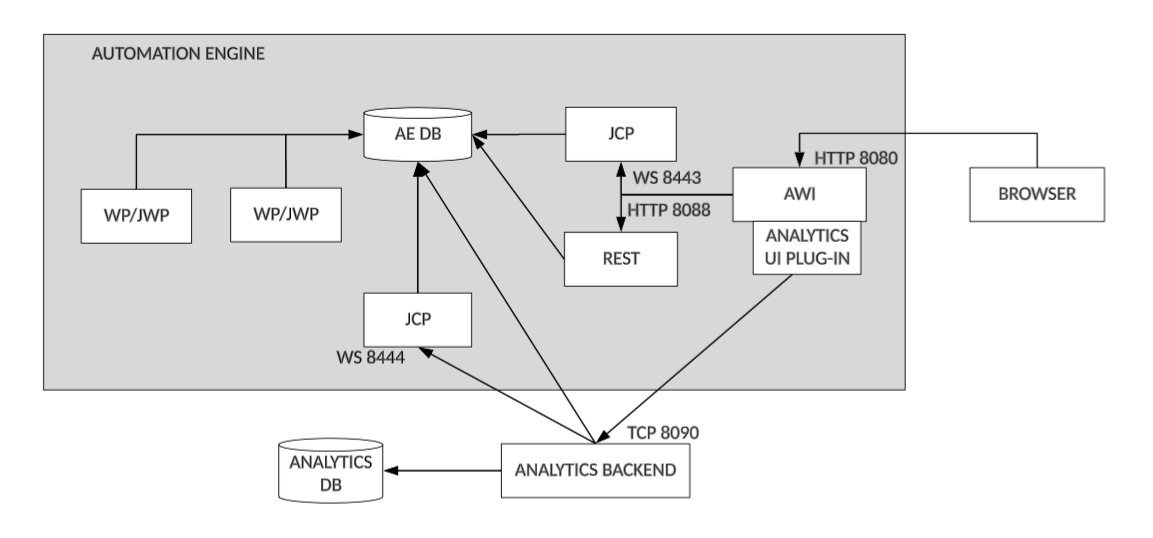
Analytics
Click the image to expand it.
-
Port for Analytics Backend HTTP 8090/ HTTPS 8443
Communication between Analytics and Automic Web Interface.
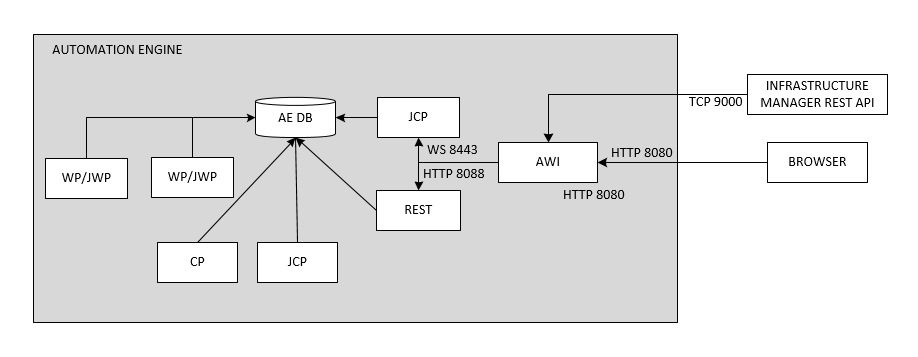
Infrastructure Manager
Click the image to expand it.
-
Port for Infrastructure Manager REST API 9000 TCP
Communication between Automic Web Interface and the Infrastructure Manager REST API.
See also: