Cross-Platform Relationships
In CA7 and AutoSys you can define cross-platform dependencies between two jobs on separate instances of these automation engines. This topic describes a dependency condition that states that when a certain job on one automation engine starts, a specified other job on the second automation engine also starts. In AAI this kind of dependency relationship is called a start-to-start dependency, as it describes the dependency behavior within the processes in which they appear.
AAI can model this dependency within the related jobstream runs, and you can see this depicted in the predecessor and successor lines on the Gantt chart, as well as listed Start-to-Start Delay both in the Run Details tab of the Job Details pane as well as in an optional column on the Jobs table. For information, see CA7-AutoSys Cross-Platform (Start-to-Start) Dependencies on the Gantt View. and Jobs List and Job Details - Run History.
The following cross-platform relationships can be defined in their respective platforms:
-
From CA7 to another CA7 instance
-
From CA7 to AutoSys V2
-
From AutoSys V2 to CA7
For information about how to define cross-scheduler job relationships in CA7 and AutoSys, search for the related topics in their most recent product documentation:
-
For CA7, find the latest documentation on https://techdocs.broadcom.com/us/en/ca-mainframe-software/automation.html, and then search for the the topic titled on "Cross-Platform Scheduling."
-
For AutoSys, find the latest documentation on https://techdocs.broadcom.com/us/en/ca-enterprise-software/intelligent-automation.html, and then search for the the topic titled on "Cross-Platform Dependencies."
Preparation Steps Required in AAI
Although the cross-platform relationships between jobs in CA7 and/or AutoSys might be defined in their respective automation engines, to be able to see the start-to-start dependencies that are modeled for them in AAI, all involved platforms must be defined as schedulers in AAI and your AAI administrator or jobstream administrator has to provide some mapping information. This mapping gives AAI the name of the AAI scheduler that corresponds to the automation engine on which the successor job of such a dependency is defined. Otherwise, AAI only has the external node values but cannot determine which scheduler it belongs to.
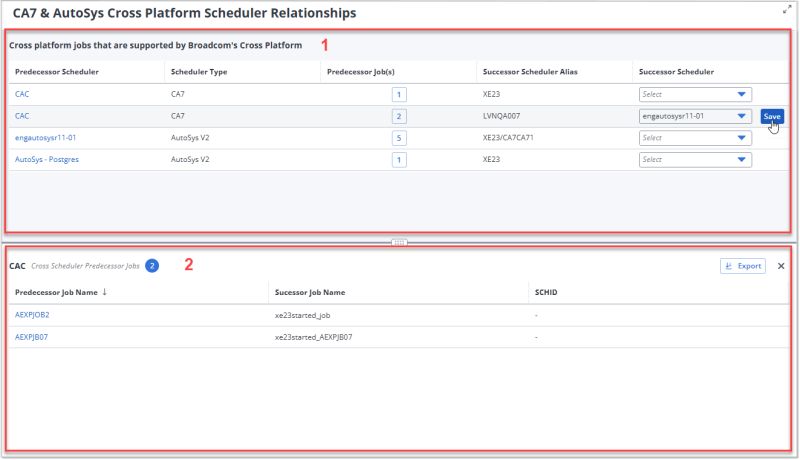
You do this mapping on the CA7 & AutoSys Cross-Platform Scheduler Relationships page.
-
The Cross-Platform Schedulers Table
The top part of the CA7 & AutoSys Cross-Platform Scheduler Relationships page contains the Cross-Platform Schedulers table that lists the schedulers involved in cross-platform dependency (start-to-start dependency) relationships. You define the mapping to successor schedulers on this table. The table is always visible when you are on the page and it is made up of the following columns:
-
Predecessor Scheduler: These are the names of the schedulers in AAI for the CA7 and AutoSys automation engines that potentially have successor jobs with a cross-platform (start-to-start) dependency on another CA7 or AutoSys scheduler. Click a scheduler name to open the details of the scheduler definition in AAI.
-
Scheduler Type: This can be either CA7, or AutoSys V2.
-
Predecessor Jobs: These are the number of predecessor jobs that AAI has identified in the jobstreams for these scheduler types.
Click anywhere in a row to open the Cross-Scheduler Predecessor Jobs table in the bottom half of the page and see the names of the jobs for the Predecessor Scheduler in that row. While the Cross-Scheduler Predecessor Jobs table is open you can click to other rows in the Cross-Platform Mapping table in the top of the page to see the jobs for each of the listed predecessor schedulers.#
To close the table, click the X in the upper right of the table or click the currently selected scheduler row in the upper table again.
-
Successor Scheduler Alias: This specifies where the successor job on the successor scheduler runs. For CA7 it is the name of the CA7 node; for AutoSys this is inbound agent. You might notice that the same Predecessor Scheduler might have more than one alias. Each needs to be mapped separately.
-
Successor Scheduler: This is the AAI scheduler name which corresponds to the Successor Scheduler Alias. This scheduler name is what you need to provide so AAI can map the predecessor-successor relationship.
You can sort by any column value by clicking its column header, once for ascending and then again for descending order, and so on. The order of the columns across the table is fixed.
-
-
The Cross-Scheduler Predecessor Jobs Table
When you select a row in the Cross-Platform Schedulers table, the Cross-Scheduler Predecessor Jobs table opens in the bottom part of the CA7 & AutoSys Cross-Platform Scheduler Relationships page.
The table shows you a list of the predecessor jobs that are defined on the predecessor automation engine with a potential cross-platform dependency to a job on another platform. The job details can help you identify which Successor Scheduler the Successor Scheduler Alias intends to point to.
In the header, you see the Predecessor Scheduler name and blue circle badge with the number of predecessor jobs that are defined for that scheduler and with the same Successor Scheduler Alias for the highlighted row in the top table. The following are the columns on the Cross-Scheduler Predecessor Jobs table:
-
Predecessor Job Name: These are the names of predecessor jobs as defined with a cross-platform job relationship to a successor job on the same scheduler that the alias points to. Click a job name to open the job details page for the job.
-
Successor Job Name: The name of the successor job. You see this also listed among the successors for the Predecessor Job Name when you open the job details and go to the Related Jobs and Jobstreams tab.
-
SCHID: This column shows the SCHID for the successor CA7 jobs, when applicable.
You can sort by any column value by clicking its column header, once for ascending and then again for descending order, and so on. The order of the columns across the table is fixed.
The following are additional actions you can take on this table:
-
Click the Export button to download a CSV file with the data from this table.
-
Click the X in the upper right corner, next to the Export button, to close the table. You can also close the table by clicking the row in the top table again.
-
As you click through the scheduler rows on the table above, the list on the Cross-Scheduler Predecessor Jobs table changes to show the predecessor jobs for the selected scheduler row.
-
Mapping Successor Schedulers in Cross-Platform Scheduler Relationships
To map the successor scheduler that corresponds to the Success Scheduler Alias, use the following steps:
-
In the navigation pane, select System and then select Cross Platform Relationships.
-
To define or change the AAI scheduler that corresponds to a Successor Scheduler Alias, click the box in the Successor Scheduler column and select a scheduler from the drop-down list of schedulers of the valid scheduler type.
(For an AutoSys predecessor scheduler, this list contains only CA7 schedulers; whereas for a CA7 scheduler, the list contains other CA7 schedulers and AutoSys schedulers.)
Because the same Predecessor Scheduler can have more than one Successor Scheduler Alias, you must map each to its corresponding Success Scheduler.
Tip:To find out which scheduler the Alias refers to, you have to go to the predecessor scheduler's automation engine and check which successor automation engine is defined in the cross-platform job relationship. Only then you can determine which AAI scheduler is the successor with the successor job.
This check is an important step because, although AAI can identify nodes and agents for jobs, nodes and agents can be defined for various purposes. Therefore, you have to manually check which nodes/agents are used in cross-platform (start-to-start) dependencies and then map them on this page.
-
Click Save.
When mapping changes go into effect
Although the mapping changes are stored in the AAI database immediately, the start-to-start dependencies will not be included in Job details nor rendered on Gantt charts of the related jobs and jobstreams at that time. When AAI has the relationship details, it can add a start-to-start dependency condition as part of the job definition. Only after the next Job Definition Update for the successor scheduler will that information be incorporated in the job definition so that users can see the dependency relationships in jobs and jobstream runs in AAI.