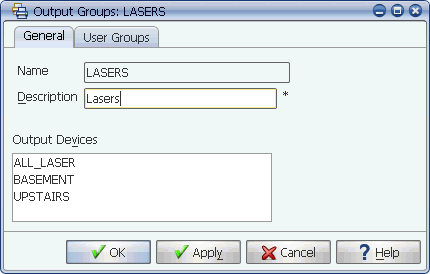
The Output Groups window
Output groups are used to define organizational classes of output devices. When you define an output device, you assign it to one or more output groups. Output from a job can be sent only to the devices included in the selected output group.
Output groups are used to define organizational classes of output devices. Output devices can include, but are not limited to, printers, fax machines, and email. Output groups are used in printer, job, and process flow definitions. When you assign an output group to a job, output from the job can be sent only to the devices included in the output group.
The Output Groups window
Applications Manager user groups control access to output groups. If you do not have access to them, see your Applications Manager administrator.
Output groups are different from output device definitions. Output groups are used to group similar output devices together into useful sets-they are basically a classification mechanism. Single output device definitions contain the specific output device attributes for a single output device. A distribution list is a special case printer definition that contains the output device attributes for several output devices.
Applications Manager ships with the ANY and SYSOUT output groups already defined. Applications Manager will use the ANY output group as a default if no other output group is defined. You will probably want to define additional output groups based on security issues (for example: a payroll check printer), printer capabilities (for example: line, dot matrix, laser), location (for example: first floor, accounting) or some other useful classification.
Procedure
To add a new output group:
Applications Manager opens the Output Groups window shown above.
The name can be up to 25 characters long. The description can be up to 30 characters long.
No output devices will be displayed in the Output Devices list when you first create the output group.
Assigning Output Groups to an Output device
You assign output groups to single output devices and distribution lists using the Output Devices window shown below. When an output device has an output group assigned to it, it is included the Output Devices box for that output group. There is one output device assigned to the output group in this example.
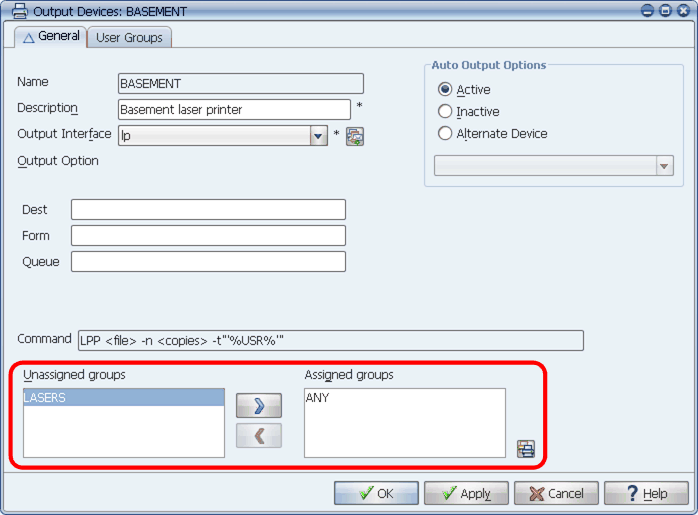
You assign output devices to an output group from the Output Devices window