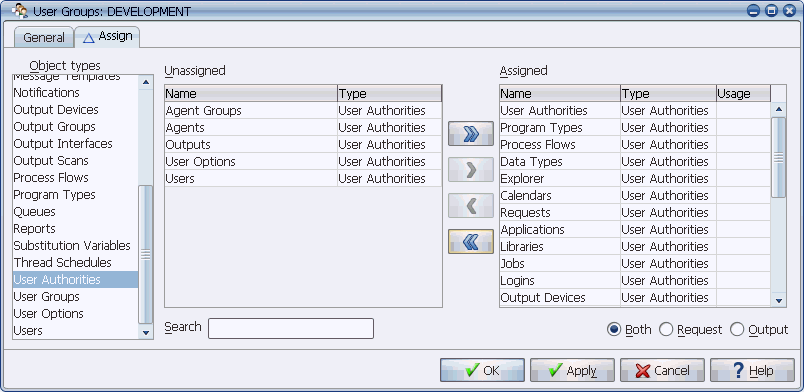
You can assign user authorities to a user group.
User authorities control user access to the Applications Manager windows. You cannot add, edit, or delete them. But you can assign them to user groups. User authorities for Applications Manager objects must be assigned to a user group with Edit authorization if you want the users who are also assigned to that user group to be able to add those objects to Applications Manager.
User authorities are a special object type that control user access to the Applications Manager windows. You cannot add, edit, or delete user authorities like other Applications Manager objects. You can only assign them to user groups as shown in the image below. Different user group access will be granted to a user, depending on whether each user authority is assigned to one or more edit user groups or non-edit user groups.
You can assign user authorities to a user group.
Adding Objects
User authorities for Applications Manager objects must be assigned to an edit user group if you want the users who are also assigned to that user group to be able to add those objects to Applications Manager. For example, users that have the Jobs user authority in an edit user group will be able to add jobs to Applications Manager. An edit user group (a user group with the Edit box checked) is shown below.
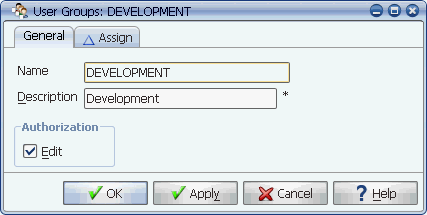
Because this user group has edit authorization, users assigned to it can add objects for all included user group associations.
Taking Actions on Tasks
In order to hold, kill, reset, or delete tasks, or to remove all predecessors for tasks in the Backlog, users must have the Explorer user authority assigned to them in an edit user group. If some users only manage tasks in Explorer and they never add, edit, or delete object definitions, you can create an edit user group that only includes the Explorer user authority and assign it to them.
Windows the Explorer User Authority Gives Users
When the Explorer user authority is assigned to a user group, users with that user group will have access to the following windows:
Accessing All Other Operations Windows
It does not make a difference whether the Output, Requests, Export, or Import windows are assigned to an edit or non-edit user group. However, when you add the Export and Import user authorities to a user group, it is also important to assign the IMPEXP job to that user group. Without it, users cannot run exports and imports.