To pass values through a process flow, add prompts to the process flow and enter numeric substitution variables in its components.
You can pass values from a process flow to its components. The values passed to a process flow come from prompts added to the process flow. You can define up to 999 values. The values can be used in prompts, conditions, and aliases (if you pass a prompt value to an alias, be sure it does not make the alias name greater than 30 characters long—doing so will cause the component to abort). By using prompts, the user can enter values in one place and have them automatically used in one, several, or all of the components in a process flow. Keep in mind that numeric substitution variables are used in process flow components, they are not supported in job and process flow prompts or conditions.
The 'numeric substitution variables' #1, #2, #3......#999 are the link between the process flow and its components. As you add prompts to the process flow, Applications Manager numbers them sequentially. When you add jobs and nested process flows to the process flow, you use the numbers assigned to the prompts in the process flow in the component prompt fields and conditions.
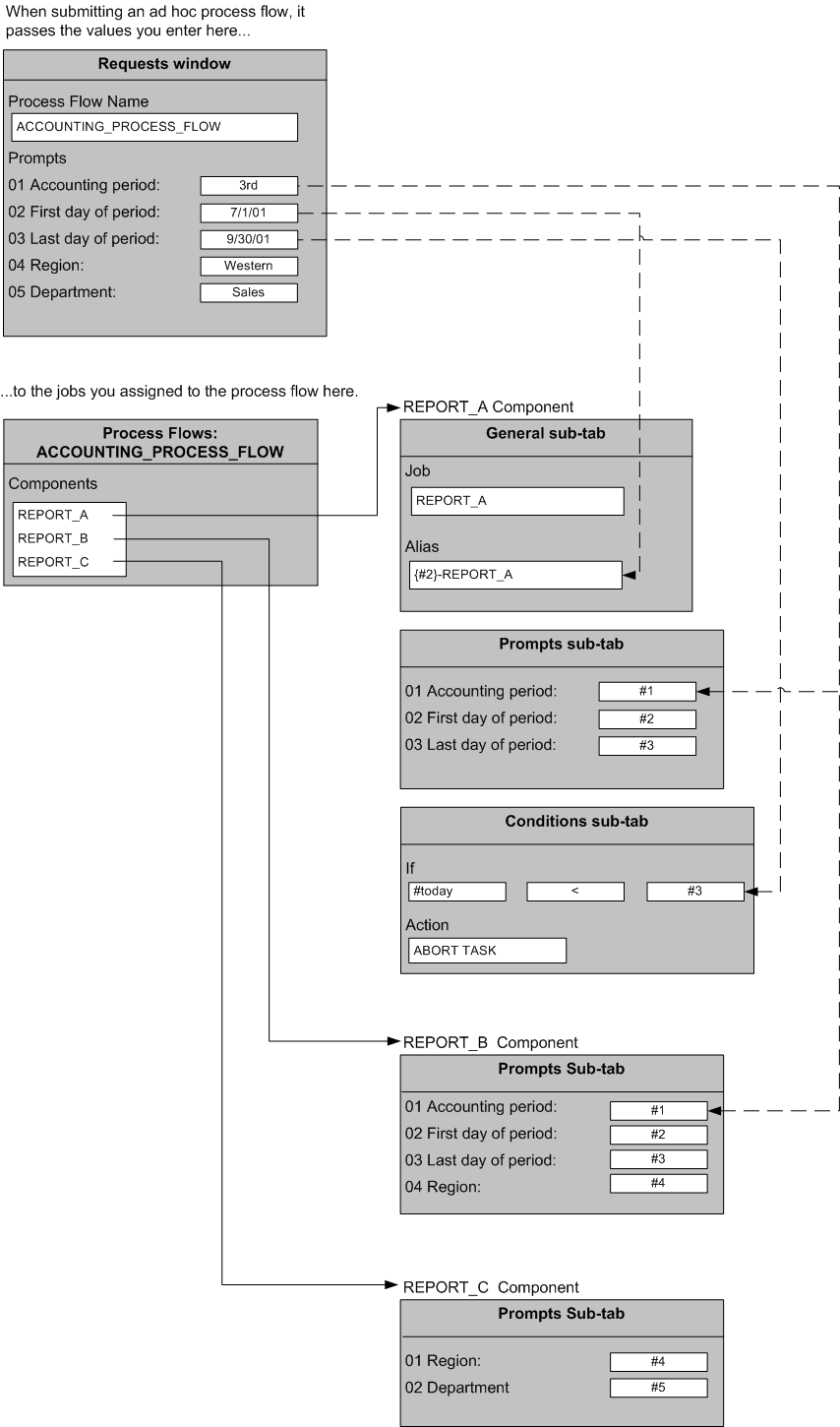
The diagram below shows an example of a process flow called ACCOUNTING_PROCESS_FLOW. The five prompts in the process flow allow the user to enter an accounting period, the first and last days of the accounting period, and a region and department. Applications Manager stores these values in substitution variables #1, #2, #3, #4, and #5.
These values are passed to the components REPORT_A, REPORT_B, and REPORT_C which are jobs in the ACCOUNTING_PROCESS_FLOW by entering the appropriate substitution variable. In REPORT_A, the value for the last day of the period is also used in a condition. The statement checks to make sure the current day is after the last day of the period. If it is not, the report is aborted. REPORT_A also uses the date substitution variable from the 'First day of period' prompt as its alias.
Prompt values can be used in any combination in any number of jobs. For example, REPORT_C uses only prompts #4 and #5. You also can mix numbered prompts with other types of prompts.
You can also use this method to pass values from a process flow to additional process flows nested within it.