Deploying a New Version of the Application
The original folder structure of the MSI Package is as follows:
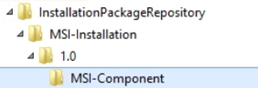
Where:
InstallationPackageRepository: Storage for all software Packages
- MSI-Installation: name of the Application
- 1.0: version
- MSI-Component: Folder that contains the MSI-file named Application.msi
- 1.0: version
Note: A new branch is created for each version of the Application.
To Deploy a new Version of the Application
- Create a new Package (for example, 2.0). For more information about how to create Packages, see Creating Packages.
- Select the newly created Package in the execution dialog.
Note: Packages are associated with an Application. You will notice that the Application name is appended to the Package name to create unique records.
Previous steps:
- Creating Entities with the Application Wizard
- Defining the Application Dynamic Properties
- Configuring Deployment Workflows
- Creating and Modifying Dynamic Properties for the MSI-Install Component
- Deploying the Application to a Test Environment
- DIY - Deploying an Application to a Production Environment