Transitioning from Automic Automation On-Premises to Automic SaaS
This section of the documentation explains the Automic SaaS architecture, the differences between the on-premises and the SaaS models and it outlines the procedure to transition from an on-premises Automic Automation instance to Automic SaaS. The following videos outline the procedure to transition an on-premises Automic Automation instance to the Automic SaaS model:
-
Transitioning from Automic Automation On-Premises to Automic SaaS - Overview
-
Transitioning from Automic Automation On-Premises to Automic SaaS - New Agents
-
Transitioning from Automic Automation On-Premises to Automic SaaS - Existing Agents
-
Transitioning from Automic Automation On-Premises to Automic SaaS - Configuration Data
Important! Make sure you have all the information required ready before transitioning to an Automic SaaS model. For more information, see Getting Started with Automic SaaS for Administrators.
This page includes the following:
Automic SaaS Architecture
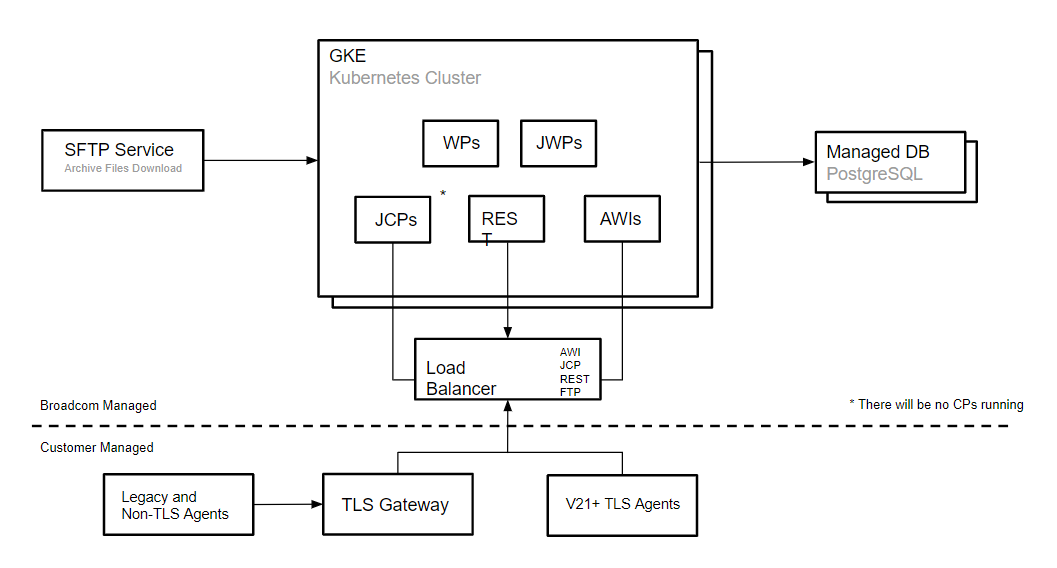
Automic SaaS is Automic Automation Kubernetes Edition hosted on the Google Cloud Platform. The following graphic illustrates the most important Automic SaaS components and identifies who manages them:
For more information, see About Automic SaaS.
Automic SaaS vs Automic Automation On-Premises
The main architectural difference lies in the scope of responsibilities and the reduction of technical components that system administrators must deploy and maintain. While the backend / server components are Broadcom's responsibility, system administrators and object designers are still responsible for process configuration and automation - that is, the functional elements of an Automic SaaS instance - such as deploying Agents, managing Clients other than Client 0, including security and User management in those Clients and so on.
In some cases, you have restricted access to certain functionalities - for example, certain changes to system settings. However, you can place a service request to change them.
For more information, see:
The table below lists different aspects of an Automic Automation on-premises instance that lie completely in the hands of administrators and/or object designers and compares them to an Automic SaaS environment.
| Function | On-Premises | SaaS |
|---|---|---|
| AE / DB / Utilities / AWI | Yes | No, Broadcom |
| Agents | Yes | Yes |
| Muti-type DB | Yes | No, PostgreSQL managed by Broadcom |
| Admin privileges | Yes | Restricted & Service Request |
|
Legacy GSS Agents |
Yes | Yes |
| Legacy Java API | Yes | Via code change, TLS and JCP |
| Transport Case for transition | Yes | No: Service Request (v24.2+) |
| User Management | Yes | Yes |
| Multi-Client | Yes | Service Request |
Supported Agents
Automic SaaS instances support the use TLS/SSL Agents version 21 and higher, as well as GSS Agents, which are older Agents that are not TLS/SSL enabled. Since there are no communication processes (CPs) available on Automic SaaS environments, GSS Agents require the TLS Gateway to connect to the Java communication process (JCP) in the Kubernetes cluster through a TCP load balancer.
All systems hosting TLS/SSL Agents and the TLS Gateway require Java to support the TLS/SSL certificate based encryption and authentication and to support the Java version of the Linux x64 and Windows Agent.
For more information, see:
-
Connecting to AWI, the JCP and REST Processes Using an Ingress
-
Installing and Configuring Agents for Container-Based Systems
Education
The Broadcom Software Academy provides a wide range of free online trainings. For information about how to navigate through the Academy and on how to register for courses, see Free Online Courses.
The following course(s) are associated with this topic: