R3_ACTIVATE_SESSIONS
Use the R3_ACTIVATE_SESSIONS script element to process batch input sessions. You can select the sessions to process using various criteria, or use the QID= parameter to start a single specific session. The queue ID of individual sessions can be retrieved from the selection results of R3_GET_SESSIONS, which are stored in the activation report or in a file.
Transaction: SM35
Interface: AE
Syntax — Option 1
R3_ACTIVATE_SESSION[S] NAME=...[,STATUS=...][,NOFOUND=...][,ERROR=...][,ERRORLEVEL=...][,SELECT=...][,JOBN[AME]=...][,ORDER[_BY]=...]
Parameters
| Parameter | Description | Format | Allowed Values | Default Value |
|---|---|---|---|---|
| NAME= | Selects sessions by name. Wildcard characters are supported (for example, 'xxx*'). | Script literal | n.a. | n.a. |
| STATUS=
(Optional) |
Selects sessions by status. | Script literal |
"" — Sessions to be processed E — Erroneous sessions |
"" |
| NOFOUND=
(Optional) |
Action to take if no sessions are found. | Script literal |
NORMAL — Script execution continues and the AE job ends normally. ABEND — Script execution stops and the AE job ends abnormally. |
NORMAL |
| ERROR=
(Optional) |
Action to take if one of the selected sessions terminates abnormally. | Script literal |
ABEND — Script execution stops and the AE job ends abnormally. IGNORE — Script execution continues and the AE job ends normally. |
ABEND |
| ERRORLEVEL=
(Optional) |
Maximum percentage of erroneous transactions allowed. The AE job ends abnormally if this value is exceeded. | Script literal | n.a. | 101 |
| SELECT=
(Optional) |
Specifies whether sessions are selected once or continuously. | Script literal |
ONCE — The number of selected sessions is retrieved once. EVERY — The number of selected sessions is retrieved after each session release, enabling parallelization of released sessions. |
ONCE |
| JOBN[AME]=
(Optional) |
Specifies the SAP job name used to process each session. | Script literal |
ATTRIBUTE — Uses the contents of the Job Name text field in the host attributes. If no text is defined, a standard AE job name is created. For more information, see SAP ABAP, Java and PI. SESSION — Uses the name of the session being processed. |
ATTRIBUTE |
| ORDER[_BY]=
(Optional) |
Defines the order in which batch input sessions are processed. The selection is sorted according to the criteria specified in this parameter. Supported as of SAP version 4.6. All field names of the SAP table APQI can be used. Example: ORDER_BY=GROUPID |
n.a. | n.a. | n.a. |
Examples
The following example processes all sessions named 'FI*'. The job ends abnormally if it contains invalid transactions.
R3_ACTIVATE_SESSIONS NAME='FI*',STATUS=,NOFOUND=NORMAL,ERROR=ABEND,ERRORLEVEL=0
Syntax — Option 2
R3_ACTIVATE_SESSION[S] [QID=...][,NOFOUND=...][,ERROR=...][,ERRORLEVEL=...][,JOBN[AME]=...]
Parameters
| Parameter | Description | Format | Allowed Values | Default Value |
|---|---|---|---|---|
| QID=
(Optional) |
Queue ID that uniquely identifies a batch input session. Use this parameter to start a single specific session. | Script literal | n.a. | n.a. |
| NOFOUND=
(Optional) |
Action to take if no sessions are found. | Script literal |
NORMAL — Script execution continues and the AE job ends normally. ABEND — Script execution stops and the AE job ends abnormally. |
NORMAL |
| ERROR=
(Optional) |
Action to take if one of the selected sessions terminates abnormally. | Script literal |
ABEND — Script execution stops and the AE job ends abnormally. IGNORE — Script execution continues and the AE job ends normally. |
ABEND |
| ERRORLEVEL=
(Optional) |
Maximum percentage of erroneous transactions allowed. The AE job ends abnormally if this value is exceeded. | Script literal | n.a. | 101 |
| JOBN[AME]=
(Optional) |
Specifies the SAP job name used to process each session. | Script literal |
ATTRIBUTE — Uses the contents of the Job Name text field in the host attributes. If no text is defined, a standard AE job name is created. For more information, see SAP ABAP, Java and PI. SESSION — Uses the name of the session being processed. |
ATTRIBUTE |
Examples
The following example starts a single batch input session using a queue ID:
R3_ACTIVATE_SESSION QID='20020318171302022315'
Important Considerations
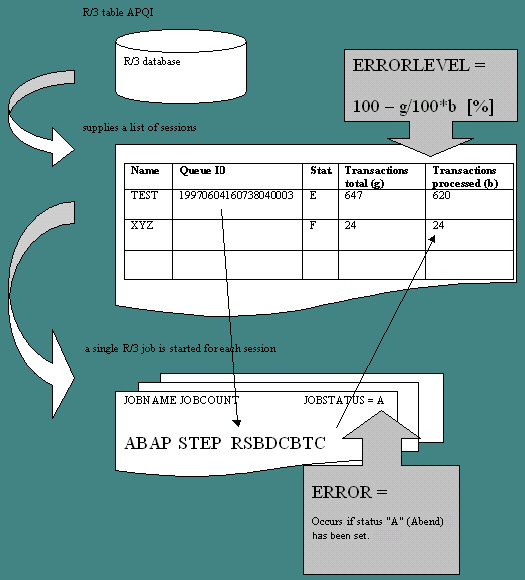
When processing R3_ACTIVATE_SESSIONS, AE first retrieves a list of sessions to process from the SAP system. Each session is processed with an individual SAP job called a replayer. A replayer uses the RSBDCBTC ABAP program to process sessions.
-
ERROR refers to the result (status) of the replayer. The status can be "A" for abend or "F" for finished successfully.
-
ERROR=IGNORE — The next session on the list is processed regardless of the previous replayer's result.
-
ERROR=ABEND — Session processing stops immediately if a replayer ends with status "A". The AE job abends.
-
ERRORLEVEL always refers to the session itself and is checked when the replayer ends. It defines the percentage of incorrectly processed transactions within a session. When the session value is exceeded, processing of the AE job is canceled and no further sessions are processed. Successfully processed transactions are only checked if an ERRORLEVEL is specified.