Installing the Online Documentation
The WebHelp format is available for the Automic Web Interface (AWI) as manually installed version or documentation online.
As of version 11, help is delivered only in English for major version releases. German and French versions are delivered with the first service pack.
In this document you find the following sections to help you decide on the help format and guide you through installation and copy&paste procedures:
- WebHelp Browser Compatibility
- Documentation Formats
- Documentation Types
- Deciding on a Location for Your Documentation
- Using the CA Automic Workload Automation Guides in WebHelp Format
- Copying and Unzipping the CA Automic Workload Automation Messages in WebHelp Format
For Automic WebHelp in HTML5 format the same browser compatibility applies as for the AWI. Please check our Automic Compatibility Matrix for details.
JavaScript
must be enabled in order to use the complete functional range.
CA Automic Workload Automation documentation is available in the following formats:
- WebHelp: You can run the WebHelp on all platforms with an HTML browser.
| The documentation type: | Is available in the following format(s): | That you: |
|---|---|---|
| All Guides | WebHelp |
Install by:
|
| Messages | WebHelp |
Install by:
|
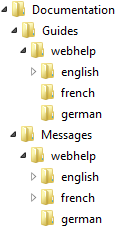
You can install each documentation type in the language(s) of your choice. In the image below, documentation in all formats, types, and languages are installed in a Windows directory.
Deciding on a Location for Your Documentation
CA Automic Workload Automation documentation can either reside locally on the machine where each AWI is installed or at a shared location that can be accessed by all users.
Using the CA Automic Workload Automation Guides in WebHelp Format
As of v12 the WebHelp can be used from any local folder or a network drive. Open the help.htm file of the documentation in that path.
Alternatively you can use the online WebHelp at this URL:docs.automic.com
Call that URL and choose the product and guide from the menu provided.
As administrator provide the information where users can find the WebHelp, locally or online.
To install the CA Automic Workload Automation guides in WebHelp format:
- From IMAGE:DOCUMENTATION\GUIDES\WEBHELP, navigate to the language(s) you wish to add WebHelp documentation for.
- Copy and unzip the contents of the .zip file(s) to the location(s) you want them.
In each language's sub-directory, there is a .zip file.
In the image below, the contents of the .zip file are unzipped in the \Documentation\Guides\webhelp\english directory.

| To open the CA Automic Workload Automation WebHelp documentation: | Do this: |
|---|---|
| Manually from the Windows directory where you copied it | Double-click the start page help.htm. |
| Manually from the online URL | Call the URL: docs.automic.com |
As of version 11, help is delivered only in English for major version releases. German and French versions are delivered with the first service pack.
Copying and Unzipping the CA Automic Workload Automation Messages in WebHelp Format
To copy and unzip the CA Automic Workload Automation messages in WebHelp format:
- From IMAGE:DOCUMENTATION\MESSAGES\WEBHELP, navigate to the language(s) you wish to add messages in WebHelp format for.
- Copy and unzip the contents of the .zip file(s) to the location(s) you want them (usually \DOCUMENTATION\MESSAGES\<language>).
In each language's sub-directory, is a .zip file.