Upgrading CDA from Version 12 to 24.1
Guidelines for upgrading to the latest CDA version.
Note: Contact CA Automic in case you need any help while upgrading.
This page includes the following:
Preliminary Information
Notes
Important! Always test thoroughly your CDA production system in a separate environment before upgrading.
Note: Is it CDA Version 11 or 24.1?
The version of the technical Release Manager component is 11.0 and the version of the downloadable 'Automic Continuous Delivery Automation' offering is 24.1.
Check Incompatibilities between Version 12 and 24.1
- CDA v24.1.x is only compatible with AE v24.1.x and AWI v24.1.x.
- All required Action Packs must be upgraded to the latest version. For more information, see Installing Packs.
System Overview
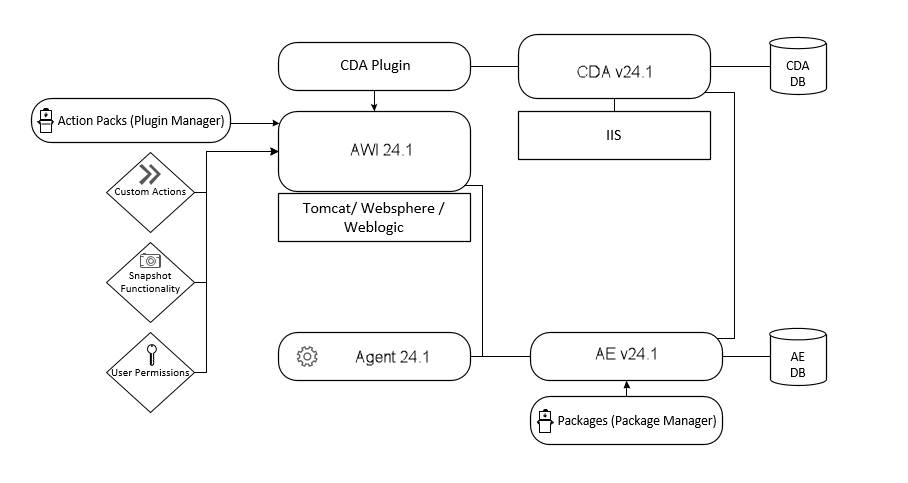
Installation Steps
| Upgrading the AE System from Version 12 to 24.1 | » | Upgrading the CDA Component from Version 7 to 11 | » | Upgrading the Package Manager | » | » | Upgrading the Analytics Backend/IA Agent |