About Proxy
The Proxy is an additional service program that can only be used in combination with the Automation Engine.
Proxy is supplied as a separate product.
General Considerations
The Proxy as of version 2 works with Automation Engine version 11.2 and above exclusively.
Different components such as agents, Automic Web Interfaces, and APIs (CallAPI, JavAPI) connect to the server component of the Automation Engine (as of v9 referred to as the "Automation Engine"). A dedicated connection to the communication processes (CPs) of the server component is set up for each component. Each of these connections must be specifically permitted when using a firewall, which involves increased configuration effort.
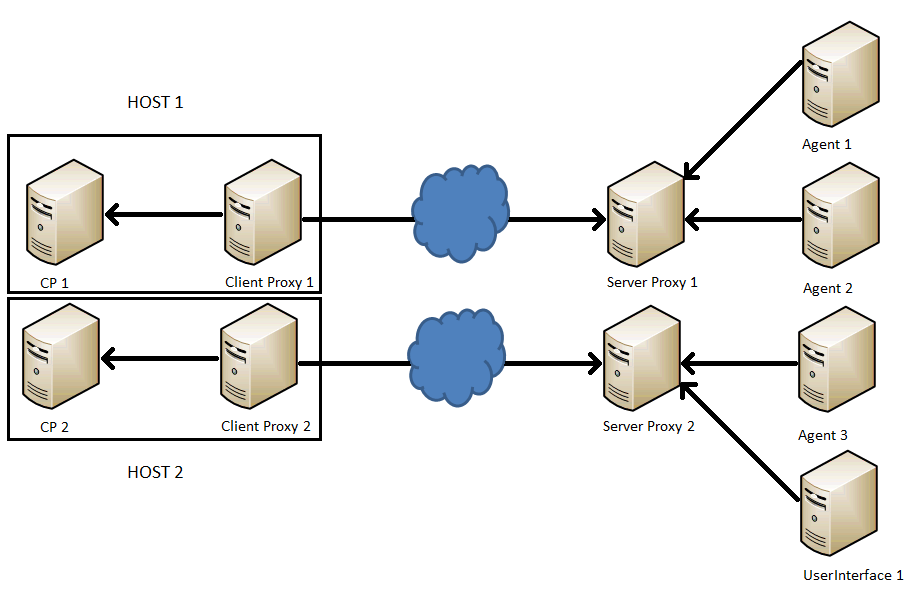
The Proxy application allows you to combine the CP connections of the Automation Engine (AE) components (agents, dialogs, etc.) into one connection and reverse the direction in which the connection was set up. This requires an instance of the Proxy on both the component and server side. The client Proxy concerns every instance of the Proxy that runs on the side of the CPs. An instance that runs on the side of the AE components (such as agents) is referred to as a server Proxy. Each client Proxy also requires a server Proxy. The client and server Proxy are run as a Proxy pair, meaning that the server Proxy allows the connection to one client Proxy.
Thus you need to configure the connections from the Proxy in the firewall just once. New components (such as agents), that should connect to the server component, must be allocated to one respective server Proxy only.
Tip: Run at least two Proxy pairs in parallel for the same AE component and link them to one another (INI file of the client Proxy: [OTHER_SP_LIST] section). This increases reliability in case one Proxy pair fails.
As of version 2.0/11.2 (PROXY/Automation Engine) alternatively you may define Proxy segments, thus server Proxy information will be automatically distributed by the client Proxy itself, dispensing with the necessity to maintain the [OTHER_SP_LIST].
Information: The server Proxy does not require an INI file as it receives the relevant settings from the client Proxy via the service connection. Both the server and client Proxy are configured with the INI file on the client Proxy side.

As of version 2.0/11.2 (Proxy/Automation Engine) the client Proxy is visible in the AE's Administration perspective in the agent section. Thus you may see at once which Proxy pairs are online or offline.
In order to achieve this, a new way to connect has been introduced: The client Proxy connects as an agent via the so-called technical connection to an AE system's communication process.
You may use the Proxy together with the net area function in Automation Engine, where the agent would connect via the Proxy with the CPs contained in one net area. This applies, when using cpSelection = 1 in the Proxy's .INI. For details on net area setup and configuration please refer to the section "Net Areas in the AE" in the Automation Engine documentation.
Nested Proxies are not supported. For example it is not possible to route the agent over two Proxies like: Agent > ProxyServer < ProxyClient > ProxyServer < ProxyClient -> CP process.
Proxy as an Agent
As of version 2.0 of the Proxy (Automation Engine 11.2) the client Proxy will by default connect to the AE system via a so-called technical connection as an agent.
One advantage of this new connection is the fact that the Proxy pairs' status will now be visible in the agent section of the Automation Engine's Administration perspective, by showing all online client Proxies.
The section [CP_LIST] of the INI file is filled in automatically during technical connection set up.
In case you define Proxy segments the information in the [OTHER_SP_LIST] section will be overruled.
The Proxy pairs (client and server) of an AE system may be clustered into so-called segments.
In order to create segments, use the parameter segment= in the INI file of the respective client Proxy. To cluster the Proxy pairs into segments enter the same segment name in the INI file of each client Proxy, that should be part of the segment.
By definition the start of a segment's Proxy enables the AE system to store the IP address information and distribute it. The AE system also keeps track of the Proxies' status and updates the IP list accordingly.
The section [OTHER_SP_LIST] doesn't have to be configured manually anymore in case of existing segments and will be overruled by the server Proxy information, which is managed and distributed by the AE system .
Load Balancing
The client Proxy can select a Communication Process (CP) depending on the load of the communication process of an AE system (load balancing). If load balancing is activated, the client Proxy searches for other Communication Processes from the same AE system and automatically connects to the one that has the fewest connections.
You can activate and deactivate load balancing on the CP side in the client Proxy’s INI file (parameter: cpSelection=).
The client Proxy connects to a specific CP, if load balancing is deactivated.
Inactive Load Balancing
Load balancing is deactivated in the following example. Client Proxy 1 and 2 are only connected to one single CP.
This setting is required if you are using Automic Web Interfaces and CallAPIs.
Active Load Balancing
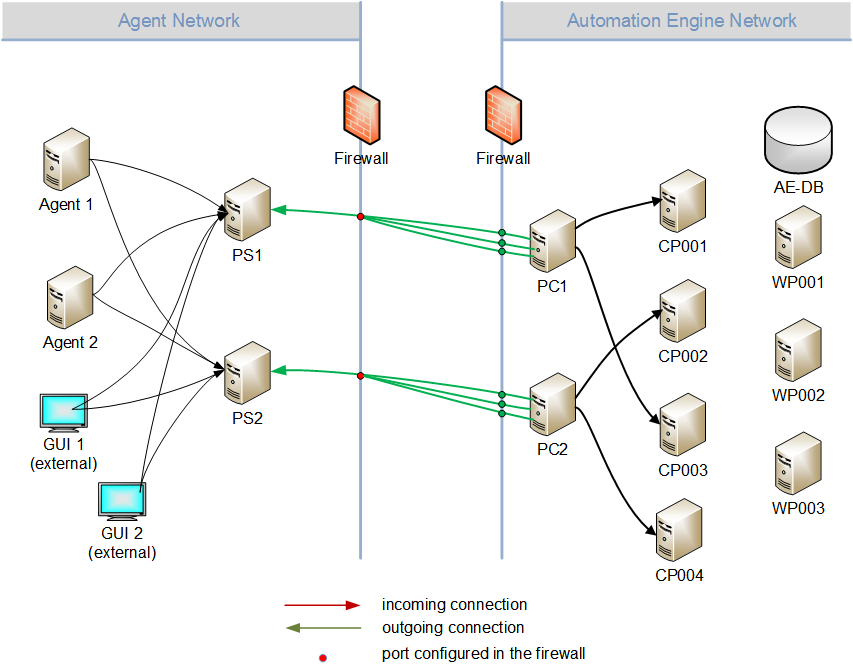
Load Balancing is activated in the following example. When establishing the connection, the client proxies select the CP from all of the available CPs depending on the load (only CPs within the same net area are taken into account in AutomationEngine v9 SP 3 and later).Client Proxy 1 (PC1) forwards connections from Agents 1 and 2 from Server Proxy 1 (PS1) to CP1 and CP3. Client Proxy 2 forwards connections from Agent 2 and Automic Web Interface 1 to CP2 and CP4.
Terminology
| Keyword | Description |
|---|---|
| Proxy | The Automic product that combines and reroutes CP connections. |
| Client Proxy | The Proxy instance that runs on the side of the communication processes. Establishes a connection to the server Proxy and forwards its connections to a CP. |
| Server Proxy | The Proxy instance that runs on the side of the AE components, which connect to a CP. Reroutes the connections from agents, APIs, dialogs, etc. to the client Proxy. |
| Server component |
The core component of the Automation Engine. Consists of multiple communication processes (CPs) and work processes (WPs). Also referred to as "Automation Engine" in versions 9 and 10. Known as "UC4 Server" in previous versions. |
| Communication process (CP) | Part of the server component to which AE components (such as agents) connect. |
| Work process (WP) | Part of the server component that takes over processing. |
| Routing port | The port of the Proxy server to which AE components such as agents and Automic Web Interfaces connect. |
| Load balancing | The client Proxy performs a load-dependent CP selection. You can activate and deactivate this in the INI file. |
See also: