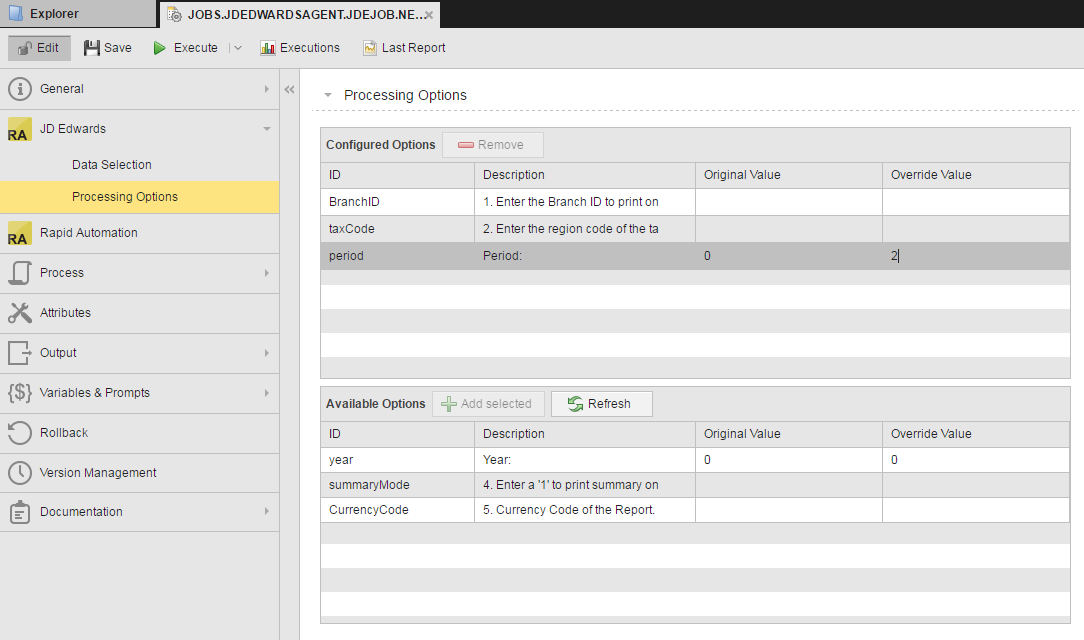
Change processing options by adding and editing them for JD Edwards jobs.
Processing options are report logic you can edit for the job. If you wish to change them, you add them to the job definition and edit them.
To add processing options to a JD Edwards job:
Available statements are listed in the Available Statements table.
The statements are added to the Configured Options table.
If you choose a BW operator as the comparison, the override needs to be in the format <value>-<value>. If you choose an IN or NI operator as the comparison, the override needs to be a comma separated list. With any other comparison, you can select any available Business view or value.
Known JD Edwards Bug to Be Aware Of
There is a known bug in some versions of the JD Edwards API where jobs with processing options that have a value greater than 32 characters fail when run by runubexml. The workaround is to add the processing options with values greater than 32 characters to the JD Edwards job in the Automation Engine.