Installing the Internal Web Services
Important! The AE Internal Webservice was the previous method used to communicate with the system and is supported only for partners that have legacy installations and integrations to maintain. They will be deprecated in a future release. For new installations and integrations, the REST API is the newer and preferred communication technology. For more information, see REST API.
The Automation Engine and the Java components, such as AWI, communicate using TLS/SSL. These components establish a connection with the Java communication process (JCP), which uses trusted certificates to prove its identity to other communication partners.
When you used certificates signed by a CA, the certificates are stored in the respective Java or OS store by default; that is the Java trust store for Java components. In this case, you only have to check that the root certificates already are in the respective store.
If you do not want to use the default locations for the relevant component, make sure you use the trustedCertFolder= parameter in the respective configuration (INI) file to define the path to the folder where the trusted certificates are stored.
For more information, see TLS/SSL Considerations for Automic Automation and Securing Connections to the AE (TLS/SSL).
Note: Only a subset of the components listed is available for Automic Automation Kubernetes Edition. For more information, see Installing the Additional Components - Container-Based Systems.
System Overview
Important! Please note that if you are building new integrations, we recommend that you use the AE REST API. Although Automic continues to support the AE Internal Webservices for our partners that have legacy integrations to maintain, the REST API is the newer and preferred communication technology. For information, see REST API
Click the image to expand it.
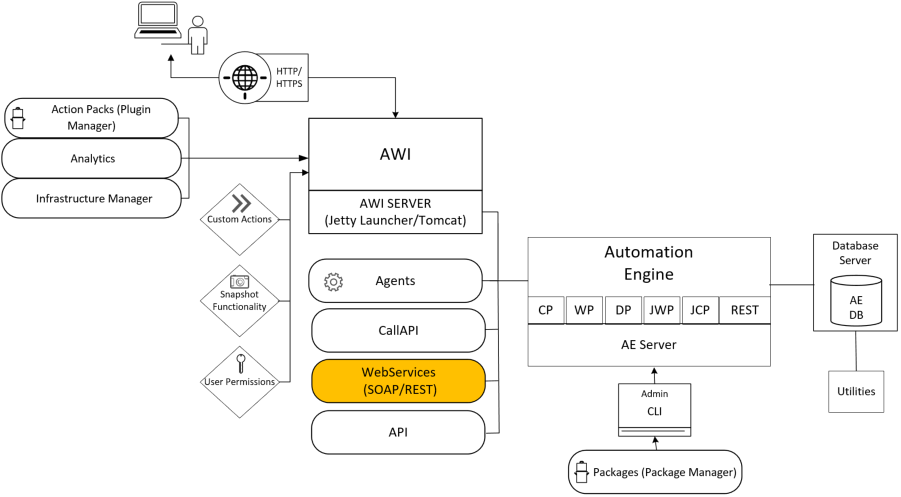
This section includes the following pages: