Manual Installation

Installing your system manually is recommended for remote installations as well as for installing only certain components. Production environments are usually installed manually, the exception being single server installations. Here you find the necessary steps for installing an Automic Automation system.

System Overview 

Click the image to expand it.
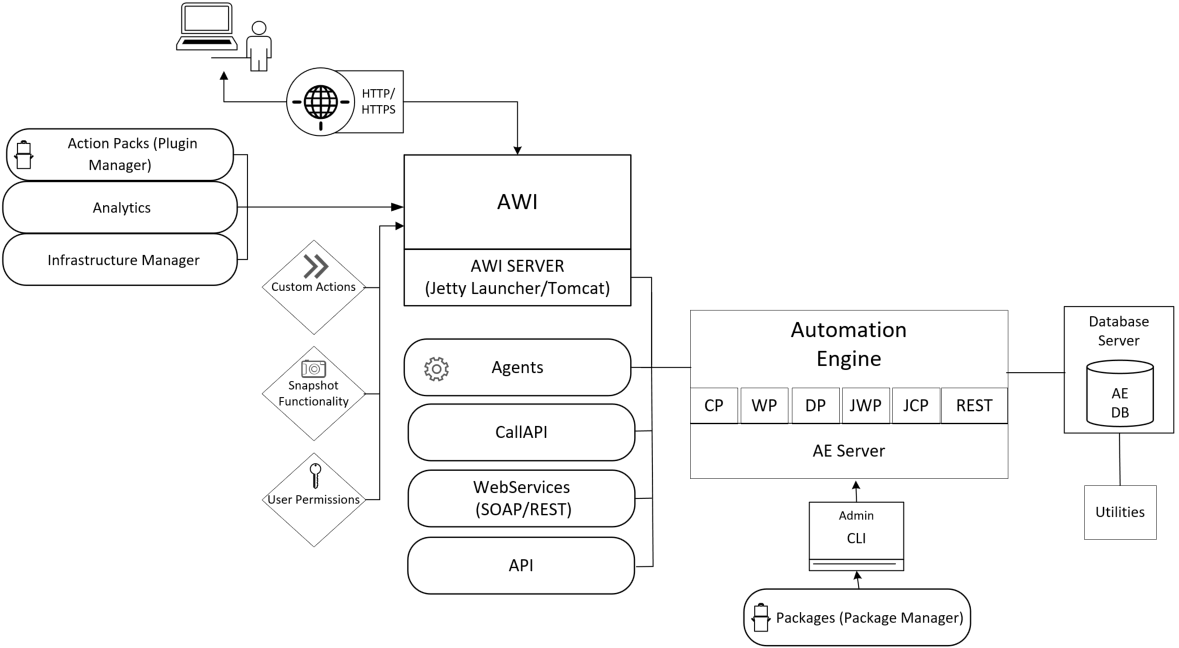
The image is a logical architecture diagram for Automic Automation, illustrating component interactions across a typical deployment. Central to the diagram is the Automation Engine (AE), connected to an AE Database server and supported by agents, CallAPI, WebServices (SOAP/REST), and traditional API interfaces. The AE communicates with a range of processes: Communication Process (CP), Work Process (WP), Dialog Process (DP), Java Work Process (JWP), Java Communication Process (JCP), and REST API. The Automic Web Interface (AWI), running on a Jetty Launcher or Tomcat server, acts as the main browser-accessible entry point. AWI integrates with action packs (via Plugin Manager), analytics modules, and the infrastructure manager. Functions such as custom actions, snapshot functionality, and user permissions are delivered through AWI. End-users access AWI over HTTP/HTTPS. Supporting administrative tasks, there is a CLI admin interface linking to the AE and Package Manager utilities. Automation AI and LLM are shown interfacing with the AE’s REST API, illustrating integrations with modern AI automation capabilities. The utilities module connects to both AE Server and Database Server, facilitating orchestration and maintenance tasks.

Installation Steps

  1. Preparing for the Manual Installation
  2. Installing the Automation Engine (AE)
  3. Installing the Automic Web Interface
  4. Installing the Agents
  5. Creating Clients and Users

Education

The Broadcom Software Academy provides a wide range of free online trainings. For information about how to navigate through the Academy and on how to register for courses, see Automic Automation Education and Training.

The following course(s) are associated with this topic:

See also:

This section includes the following pages: