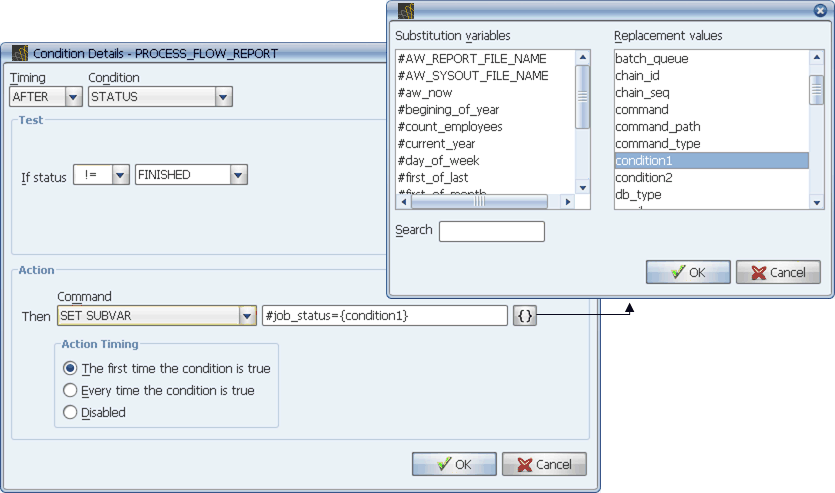
In this condition, a replacement value is used to set the value of a substitution variable.
You can add a substitution variable or replacement variable to a field using the Subvar Replacement Values window.
Substitution variables and replacement values can be used in a number of places in Applications Manager. If a field accepts substitution variables or replacement values, it will be followed by a { } button.
In this condition, a replacement value is used to set the value of a substitution variable.
In the image above, if the task does not complete successfully, the {condition1} replacement value is used to set the value of the #task_status substitution variable to the status of the task. This substitution variable can then be evaluated in other conditions.
Procedure
To add a substitution variable or replacement variable to a field with the Subvar Replacement Values window:
Applications Manager displays the Subvar Replacement Values window shown above.
You can type the first letter of a value to highlight it.
If the cursor is in the middle of a text string when you bring up the Subvar Replacement Values window, Applications Manager will place the value at the cursor's position.
You can enter substitution variables/replacement values by typing the value into the field. Substitution variables are preceded by a '#'. Replacement values are written inside curly braces, '{ }'.
Substitution Variables Evaluated as Characters or Numbers
Applications Manager evaluates substitution variables as characters or numbers depending on the qualifier value used in the Condition Details window. For example, the condition #flow = bad will be evaluated as a string. The condition #count_employees LE 100 will be evaluated numerically. For a complete list of string and numeric qualifiers, see Selecting Condition Qualifiers.
To ensure proper evaluation of dates, use YYYYMMDD format with string qualifiers (>, <=, =) or Julian dates (dates expressed as the number of days elapsed since January 1, 4713 B.C.) with numeric qualifiers (for example GE, LE).