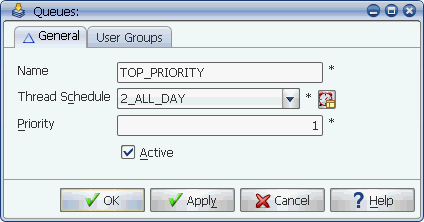
The Queues window
To define a queue, you must name the queue, assign it to a thread schedule, set its priority, and make the queue active or inactive.
You control the flow of tasks to servers by using Applications Manager queues. All tasks pass through an Applications Manager queue to get to a server. You control queue throughput by assigning each queue to a thread schedule.
The Queues window
Applications Manager user groups control access to queues. If you do not have access to them, see your Applications Manager administrator.
Procedure
To add a queue:
Applications Manager opens the Queues window shown above.
| Field | Description |
|---|---|
Name | The name may be up to 30 characters long. |
The thread schedule controls the maximum number of concurrent tasks that can run through the queue and the number of threads that are reserved for the queue at any given time. For more information, see Defining Thread Schedules. | |
Defines the order in which each queue is scanned for task execution if the maximum number of threads for an agent is reached. Queues are scanned starting with the number 1 and ending with 99. The execution order of tasks waiting to run in a QUEUED status is decided in the following order:
Therefore, if two tasks are waiting to run in different queues, and those queues have the same priority, the jobs' priority is checked. If queue and job priorities are the same, their start date and times are compared. | |
Click the Active check box to activate the queue. Active queues apply the thread settings. When you inactivate a queue, no tasks will be processed through it. The tasks will remain in the Backlog with a QUEUE WAIT status until the queue is activated. |
Editing Queues in Explorer
Applications Manager operators with the necessary user group access can alter queue definitions from Explorer. For more information, see Changing Queue Settings.