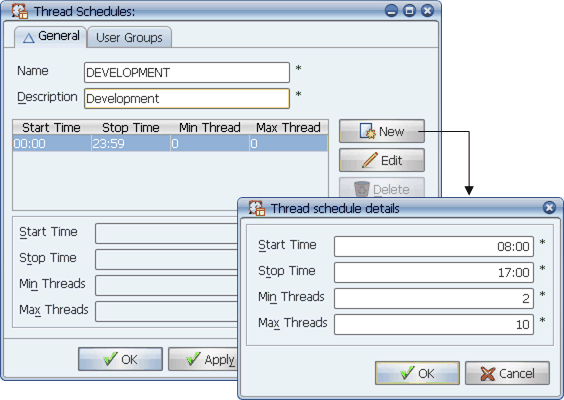
To add an entry to thread schedule, click New.
A thread schedule defines the number of concurrent tasks that can run through a queue during a specified period of time. You can set different minimum reserved and maximum thread limits for different periods of time during the day.
A thread schedule is assigned to each Applications Manager queue. Thread schedules determine the number of:
You can divide a thread schedule to cover different time periods during a day. For example, during normal work hours you may want to limit a queue to two concurrent tasks, then in the evening reset the queue to 10 concurrent tasks. Each thread schedule must cover the full 24 hours in a day.
To add an entry to thread schedule, click New.
Applications Manager user groups control access to thread schedules. If you do not have access to them, see your Applications Manager administrator.
Procedure
To define a thread schedule:
Applications Manager opens the Thread Schedules window shown above.
Note that there is one entry in the table on the General tab.
Applications Manager opens the Thread schedule details window where you can specify the details for each entry in your schedule.
| Field | Description |
|---|---|
Start Time | The start time for this entry (hh:mm). |
Stop Time | The stop time for this entry (hh:mm). |
The number of the automation engine's threads you wish to reserve for a queue. The values can range between 0 and the maximum number of threads available on the automation engine. If one or more minimum threads are assigned to a queue's thread schedule, then even higher priority queues (queues with a lower number set in their Priority field) will have this many fewer threads available to them. This is even true when no tasks are running in the queue that is reserving the threads. | |
The maximum number of tasks that can run concurrently in the queue. The value can be between 0 and 9999. If you set the value to 0, the queue will not accept any tasks during the time period specified. Tasks assigned to this queue will show a QUEUE WAIT status. Only tasks in a RUNNING status count toward the Max thread setting. |
Applications Manager adds a new entry to the table with the values you specified. You can add as many entries to the table as needed to set different minimum and maximum values for different times of the day.
Updating and Deleting Thread Schedule Entries
To update or delete a thread schedule entry, select the entry in the table and select Edit or Delete.
Selecting Thread Schedules for Agents
You can select a thread schedule for an agent to specify the maximum number of concurrent tasks that can run on that agent at one time in all queues.