What's New in 24.6.0
Version 24.6.0 is relevant for Automic SaaS customers only.
This section provides information about the new features and enhancements that have been implemented in version 24.6.0.
Compliance
Automic SaaS is now ISO 27001 compliant.
Automic SaaS: Agents, Out-of-the-Box
Broadcom is committed to make your automation journey even smoother by bringing key Agents directly to you. As of this version, you no longer have to download, install and configure the REST Agent Integration, S3 Agent Integration and SAP Agents; they can now be pre-installed and pre-configured on request. In addition, their associated Job templates (all REST, S3 and SAP Job types) are pre-configured too to use the respective Agent, so you can focus less on setup and more on building powerful automation from day one. If, on the other hand, you need these types of Agents to access systems or services in your private data centers, you can install additional Agents.
The pre-configured Agents are assigned to Client 100 by default. A new Agent/Client Assignment (HSTA) object called HSTA.SAAS.HOSTED is now available in Client 0 that is also pre-configured to assign the Agents to Client 100. If your organization wants to use these Agents in other Clients, the Automic SaaS administrator can simply modify HSTA.SAAS.HOSTED to assign them to any other Client. For more information, see Assigning Clients to Agents.
From a technical perspective, this new feature means that the REST Agent Integration, S3 Agent Integration and SAP Agents are now deployed as containers in the Kubernetes cluster managed and maintained by Broadcom to service the Automic SaaS instances.
Enhancements to Automic SaaS' Gen AI Capabilities
This version introduces the following new features into Automic SaaS' Gen AI capabilities:
Writing and Enhancing Scripts with the AI-Powered Code Assistant
As of this version, writing scripts or improving and enhancing existing code is easier than ever. Automic SaaS 24.6 includes the code assistant, an AI-powered tool designed to help developers, specially citizen developers, create scripts. Using the new Ask Intelligent Assistant function available in the script editor, you submit your prompt in natural language stating what you want the script to do. The Intelligent Assistant responds inserting the relevant code snippets in the script editor and explaining what they do in the Intelligent Assistant panel.
With the new Ask Intelligent Assistant function you not only create new code; you can also enhance the quality of your scripts by optimizing existing blocks and suggesting more efficient methods. Simply select the lines that you want to modify and ask the assistant. It can generate code in the following languages:
-
Python
-
Windows BAT and PowerShell
-
Linux Shell
The Intelligent Assistant's Scripting Capabilities in a Nutshell
-
Code Generation
Generate proper script code based on your request. The Intelligent Assistant automatically recognizes the language it should use based on the type of object and Agent used in the object.
-
Code Optimization
Optimize existing code by identifying redundancies and suggesting improvements. You can select a block of code and ask the assistant to optimize and it. The result is an improved and more efficient snippet.
-
Inline Interaction
Interact with the Intelligent Assistant directly within the script editor. The generated code is then inserted into the next line below.
-
Code Replacement
Mark code lines and ask the Intelligent Assistant to rewrite them. The result will replace the marked lines.
-
Contextual Awareness
The Intelligent Assistant maintains context across the edit session of a script.
For more information, see:
Elevating your AI Experience: The Intelligent Assistant, A Unified Hub for Gen AI
Building on our deep commitment to leveraging Gen AI, Automic SaaS 24.6 takes your AI experience a step forward by unifying all Gen AI capabilities into a single hub, thus improving your user experience and streamlining your access to these powerful tools. This centralized access point simplifies your workflow, making it easier to harness the full potential of AI within your Automic SaaS environment.
A new bot icon in the menu bar opens the Intelligent Assistant panel:
(Click to expand)
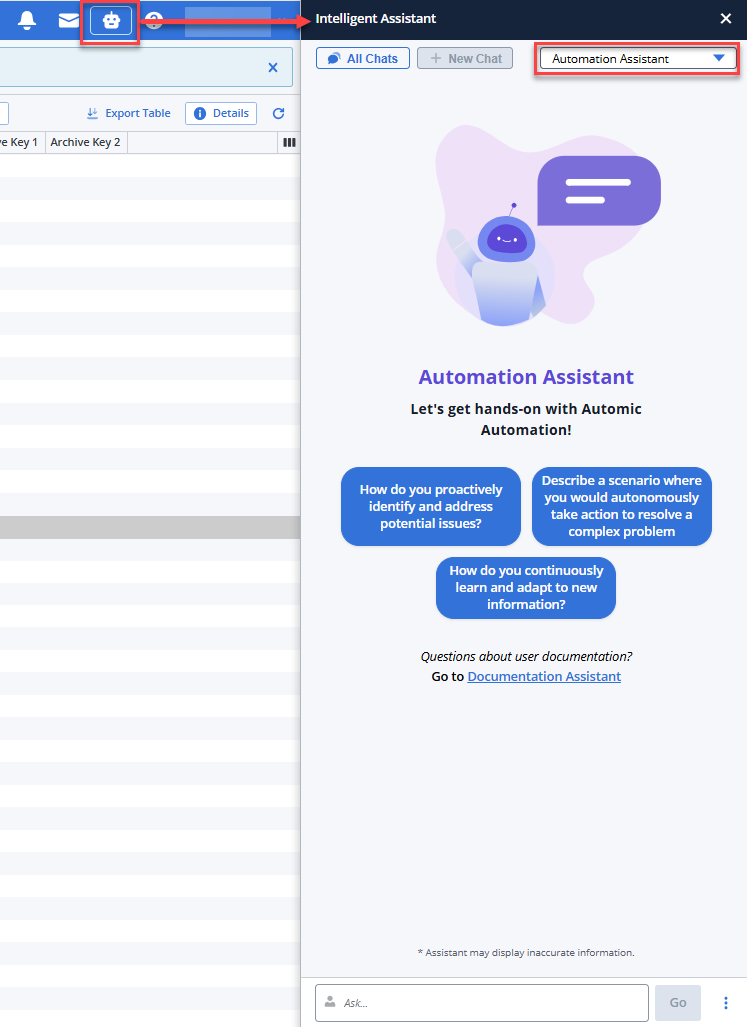
The panel gives you access to the following new functions:
-
All Chats
Opens the Conversation History, where all your questions and answers are displayed. It contains all the conversations available in a session.
-
New
Puts the focus in the Ask field at the bottom of the panel, where you can enter your next question.
-
Automation Assistant/Documentation Assistant dropdown list
Lets you select the Agent you want to answer your questions depending on their nature.
-
The Automation Assistant, your automation expert.
-
The Documentation Assistant, your product documentation expert. A beta version of this powerful assistant was introduced in previous versions and it is enhanced now.
-
-
Predefined prompts that are context-sensitive. This means that depending on the AWI area from which you have opened the assistant, the suggested prompts change. For example, if you open it from the list of Users in the Administration perspective, the suggested prompts are Which users are locked?, Show only active users, Sort users by name descending. If you open it from the list of tasks in the Process Monitoring perspective, the prompts are Show blocked workflows, Show aborted tasks from last night, Show tasks waiting for agents, and so forth.
-
Ask input field at the bottom, where you can have your conversation in natural language about all things automation with the Intelligent Assistant. The three dots beside the Go button open a menu where you can also open a new chat, access all already available chats and close the assistant.
For more information see:
Introducing Your Conversational Automation Assistant
Building on our generative AI capabilities, this version introduces the Automation Assistant, your dynamic, interactive partner for navigating the Automic SaaS environment. This intelligent bot empowers you to simply ask questions and engage in a natural conversation, providing quick access to information and insights about your operations and about your environment. Designed to leverage your Large Language Model (LLM), the Automation Assistant strives to deliver the most relevant and accurate information for your queries. Should an initial response not fully meet your needs, its true power lies in its conversational nature: you can easily ask follow-up questions, refine your query, or dive deeper into a topic, making it easier than ever to explore and understand your automation landscape.
New BEGIN_AI_CHAT and END_AI_CHAT Script Functions
These two new scripting functions allow you to specify the LLM context that you want to use for ASK_AI calls using AI's conversational language. AI contexts can be nested, thus allowing for several context open calls.
For more information, see BEGIN_AI_CHAT... END_AI_CHAT
New LLM Context Definition for ASK_AI Script Function Calls
As of this version, you can use the ChatID parameter to define one or more LLM contexts for an ASK_AI call. You do so by using the new BEGIN_AI_CHAT and END_AI_CHAT script functions to define the parameter.
For more information and examples on how to use them, see ASK_AI.
New Parameter to Define Memory Length
As of this version, you can use the automation.ai.chat-memory.messages.max parameter to define the number of messages that the LLM should keep in its memory.
For more information, see On-Premises: Preparing for the Automation.AI Installation and AAKE: Preparing for the Automation.AI Installation, respectively.
General Enhancements
This version introduces the following new features:
New AE Script Statements and Functions
This version of Automic Automation introduces new AE scripting elements that allow you to enhance your AE with powerful string and text processing. These capabilities allow you to search, match, replace, and count patterns within strings or data sequences, with full Unicode support.
Some of these scripting elements support regular expressions for advanced text searching using patterns. Some elements can work with text containers (data sequences) loaded by other scripting elements available such as PREP_PROCESS_* elements, allowing for operations on specific columns within these text containers.
For more information, see Script Statements and Functions for String and Text Processing.
Traceable Transport Case Import/Export Processes
Previous versions of Automic Automation introduced the possibility to import and export the Transport Case both directly from AWI and using the REST API. This version enhances this function making the import/export process transparent and traceable. Now, when you import/export the Transport Case, no matter whether from AWI or using the REST API, a detailed report of this operation and of the contents of the Transport Case is stored in the Automation Engine database. This enables users to easily look up the history of actions for auditing purposes.
Each import/export action generates a report that includes a list of the imported/exported objects, errors and other relevant information. Each action also creates a new entry on the Client History page (Administration perspective > Client Management > Client History), with a unique ID assigned to each entry.
For more information, see:
SAP Agent Multiple System Support
So far, unlike what happened with all other Jobs, the connection between the SAP target system(s) and Automic Automation happened through the SAP Agent. When you defined the SAP Agent, it was mandatory to specify an R3 Connection object in SAP Connections > SAP System, on the Agent definition page. Only then could the Agent connect to the SAP system.
As of this version, it is no longer mandatory to assign the Connection object to the SAP Agent. Instead, you can do so at Job level (both for SAP and for Remote Task Manager Jobs), where a new section has been added where you can select the R3 Connection object, for example:
(Click to expand)
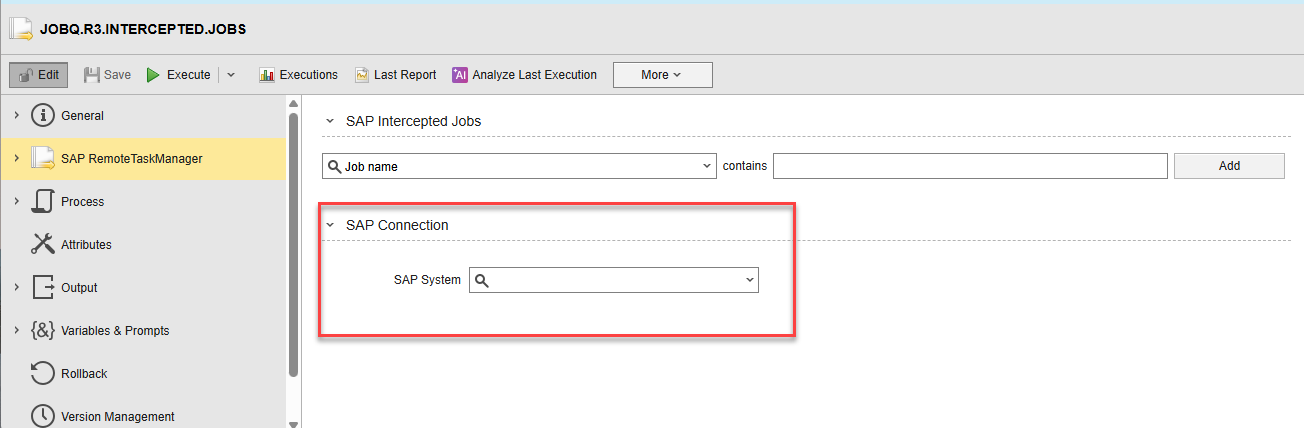
Decoupling the Connection assignment from the Agent definition allows you to use one SAP Agent to connect to various SAP target systems.
Important!
-
The SAP Agent definition does not change. You can still define the Connection object at Agent level. It is up to you and your system configuration to decide how you want to establish the connection to the target system.
-
This means that existing SAP Agents and Jobs, where the connection happened at Agent level, will continue working as expected; you do not need to make any changes.
-
What happens if an SAP Agent is already configured with the connection data and someone in your organization creates a new SAP ABAP Job defining different connection parameters in the Job definition?
This table explains all possible configuration scenarios:
Connection object assigned to Agent Connection object assigned to Job Result YES NO The Connection object assigned to the Agent is used by default. YES YES The Connection object assigned to the Job is used. NO YES The Connection object assigned to the Job is used. NO NO The Job fails because it cannot connect to the target system.
For more information, see:
Reorganizing Data Using REST/AWI
While AE DB Reorg Utility is still available, version 24.6.0 provides two new additional ways to reorganize operation data:
-
Through AWI in any Client from the list of Clients
-
Using the REST API using new endpoints to trigger the data reorganization
In either case, you no longer need to access the database; your User definition only requires the Database Maintenance privilege to be able to trigger the reorganization. Every time you start a Revision Report run, an entry is written to AWI's Client History page that shows the status of the run. You also have the option to cancel the reorganization run from the Client History page.
For more information, see :
Agent HTTPS Proxy Connection to JCP
As of this version, you can configure the Java based Agents and Agent integrations to allow proxy settings for JCP connections. To do so, the following parameters have been added to the [TCP/IP] section of the Agent's INI file:
-
proxy_host= to define the host name of the proxy server
-
proxy_port= to define the port of the proxy server
-
default_proxy= to use the system's default proxy settings
For more information, see Agents INI Files.
:DISCONNECT Scripting Element - New Parameters for HOST Connection Type
This version introduces two new, optional parameters:
-
Communication Process (CP/JCP)
-
HOST status
They allow you to define specific agents to be disconnected and/or to disconnect those connected to a specific communication process (CP/JCP). For more information, see :DISCONNECT.
Ignore Version when Installing a Pack from File
As of this version, you have the option to ignore version constrains when installing a Pack from a file or from the Marketplace. This allows you to install versions lower than the one actually installed.
For more information, see Installing Packs.
AE Logs Include Activation and Start Time
As of this version, the Automation Engine logs include information about the execution's activation and start times.
For example, the log of a Workflow with a Job:
20250716/100155.762 - U00007000 'S409448.JOBP' activated with RunID '1004020017'.
20250716/100155.821 - U00007000 'S409448.JOBS.GENATACT' activated with RunID '1004020018'.
20250716/100200.033 - U00012142 Task 'S409448.JOBP' of type 'JOBP' with RunID '1004020017' (Parent RunID '') started.
20250716/100200.047 - U00003434 Server routine  'JPEXEC_R/EXEC' required '0' minutes and '4,062' seconds for processing.
20250716/100214.666 - U00012142 Task 'S409448.JOBS.GENATACT' of type 'JOBS' with RunID '1004020018' (Parent RunID '1004020017') started.
20250716/100214.681 - U00003434 Server routine  'JPEXEC_R/EXEC' required '0' minutes and '14,594' seconds for processing.
20250716/100214.824 - U00011020 'WIN02' is reporting job status 'R' for job 'S409448.JOBS.GENATACT' (RunID '1004020018', Parent RunID: '1004020017'). Job-status number: ' 0000000001' DB: ' 0000000000'
20250716/100214.868 - U00011020 'WIN02' is reporting job status 'R' for job 'S409448.JOBS.GENATACT' (RunID '1004020018', Parent RunID: '1004020017'). Job-status number: ' 0000000002' DB: ' 0000000001'
20250716/100214.876 - U00011020 'WIN02' is reporting job status 'E' for job 'S409448.JOBS.GENATACT' (RunID '1004020018', Parent RunID: '1004020017'). Job-status number: ' 0000000003' DB: ' 0000000002'
20250716/100214.888 - U00011006 Job 'S409448.JOBS.GENATACT' (RunID '1004020018' / Workflow-RunID: '1004020017') on Host 'WIN02' ended normally. Remote ID=35932
20250716/100214.899 - U00011502 Workflow 'S409448.JOBP' (RunID '1004020017') ended normally.
Note: The logs of tasks that are not able to be started or executed, for example because they ended with FAULT_OTHER, do not contain this information.
New UC_SYSTEM SETTING: DWP_MIN_NUMBER
This version introduces a new key in the UC_SYSTEM_SETTINGS variable. DWP_MIN_NUMBER allows you to determine the minimum number of server processes per node name to be used as dialog work processes (DWP). Any additional processes are used as Work processes (WP).
If this parameter is set, it takes precedence over the WP_MIN_NUMBER system setting.
For more information, see DWP_MIN_NUMBER.
Automic Web Interface
With this version, the Automic Web Interface interface has received a significant visual refresh; it has now a sleek, modern new face designed to enhance your daily interaction and provide a more cohesive and contemporary user experience.
Refined Color Palette
AWI now sports a modern color scheme. The new colors are not only aesthetically pleasing but also optimized for clarity and readability, reducing visual fatigue and making key information stand out.
Crisp, Intuitive Icons
This release introduces a brand-new set of modern, streamlined icons that are designed for instant recognition, improving navigation and giving AWI a truly cutting-edge appearance.
Crucially, while the appearance has evolved, your interaction with AWI remains seamless and familiar. Every button, every menu, and every feature is exactly where you expect it to be. This facelift is purely aesthetic, focused on delivering a more modern, consistent, and visually appealing environment that aligns with the broader Broadcom automation ecosystem.
Important! The new Automic Web Interface requires you to use the following web browser versions:
-
Google Chrome: Minimum 138.0.x.y
-
Microsoft Edge Chromium: Minimum 138.0.x.y
-
Mozilla Firefox: Minimum 140
-
Apple Safari: Minimum 18.5
See also compatibility matrix.
AE REST API
This version introduces the following enhancements to the AE REST API:
-
New endpoints to read, add, patch and delete entries for specific keys in a static VARA
-
New endpoints to read, add, patch and delete calendar entries (events)
For more information, see REST API Reference.
Automic Automation Kubernetes Edition
This version introduces the following new features in AAKE:
LDAPS Certificates can be Stored in UC_TRUSTEDCERTS
When using LDAPS, you can store the certificates in the UC_TRUSTEDCERTS Storage object. In this case, you no longer need to configure the certificates using JWP_KEYSTORE_PATH (on-premises) or jwp-keystore (AAKE).
For more information, see:
Overwrite ODBC and JDBC Strings in AE and Analytics Database Secrets
As of this version, you have the option of overwriting the ODBC and JDBC connection strings generated by the Install Operator for your AE and Analytics databases. This allows you to customize the connection strings if you need a different format, for example, to match the settings required by a managed database.
You can do so using the overwriteODBC and overwriteJDBC parameters in the corresponding database secrets. Optionally, you could also define the relevant values in the values.yaml file; however, keep in mind it is always better to keep sensitive data in a secret.
For more information, see Preparing the AE and Analytics Database for the Container Installation.
ZDU for AAKE: Disconnecting Idle Agents
As of this version, when upgrading AAKE using the Zero Downtime Upgrade, all idle Agents are disconnected automatically so that they can reconnect to the communication processes of the target version without manual intervention.
For more information about upgrading AAKE using ZDU, see Upgrading Container-Based Systems.
Cloud Integrations
The following cloud integration Agents have been released or enhanced since Automic Automation's last release:
-
Kubernetes, see Automic Automation / Kubernetes Agent Integration.
-
Azure Logic Apps, see Automic Automation / Azure Logic Apps Agent Integration.
-
Azure Blob Storage, see Automic Automation / Azure Blob Storage Agent Integration.
-
AWS Lambda, see Automic Automation / AWS Lambda Agent Integration.
-
Azure Functions, see Automic Automation / Azure Functions Agent Integration.
-
Google Cloud Batch, see Automic Automation / Google Cloud Batch Agent Integration.
For more information on cloud integrations, see Cloud Integrations.
See also: