What's New in Version 26: AI Enhancements
This version introduces the following new features into Automic Automation's Gen AI capabilities:
The following video highlights some of the most important AI capabilities introduced in version 26: Watch The Video: Orchestrating Autonomous Intelligence.
Seamless User Experience through MCP Integration
The Model Context Protocol (MCP) acts as a universal interface between Automic Automation and the generative AI ecosystem. Through the Automation.AI component, the system dynamically discovers and maps capabilities from MCP servers, such as database connectors, API wrappers, or local files, directly into your AI Jobs. This integration ensures that the LLM has real-time access to business context and specialized tools without requiring custom "glue code" for every new data source, allowing for secure, data-driven decision-making within your Workflows.
Building on the established Automation.AI framework, Automic Automation version 26 now fully integrates with MCPs. This integration represents a significant advancement in how the Automation Engine interacts with Generative AI, providing a standardized, secure, and flexible bridge to LLMs. In practice, AI Connection objects, which define the secure gateway to these tools, while AI Jobs allow users to select and run the specific capabilities needed for their automated tasks.
The MCP integration enhances the end-user experience by powering the Automation Assistant with deeper system awareness. While the Automic MCP Server operates behind the scenes, its presence means that when you interact with the assistant, it can do more than just answer general questions; it can access real-time data and execute specific tools within your environment. This translates into more precise results, contextual suggestions that understand your specific infrastructure, and the ability to trigger complex automation tasks through simple, natural language conversations.
Key Benefits
-
Standardized Communication
MCP acts as a universal translator. It ensures that automation needs are converted into precise, reliable AI instructions regardless of the underlying model.
-
Enhanced Security and Control
Automation.AI continues to serve as a secure internal gatekeeper. All data exchanges and context management remain within your protected environment, now reinforced by the standardized structure of the MCP protocol.
-
Reduced MTTR (Mean Time to Repair)
The integration helps operators quickly diagnose failures using natural language queries instead of manual log digging.
-
Ecosystem Flexibility
This update enables a seamless, plug-and-play experience across different AI environments. Whether you are connecting to custom on-premises models or utilizing Broadcom’s Gemini model in the Automic SaaS environment, the integration ensures consistent performance.
-
Platform Flexibility
With the Automic MCP Server, Automic Automation version 26 allows you to easily build external AI agents that interact with Automic Automation using any of the tools that the MCP server exposes.
-
Faster and more Secure Journey into generative AI
This architectural upgrade allows you to focus on building intelligent automation without worrying about the complexities of individual LLM integrations.
For more information, see:
AI-Augmented Workflow Creation
Version 26 introduces Augmented Workflow Creation, a transformative leap in how automation is developed. This new feature uses generative AI to turn natural language conversations into complex automated processes. Now, both experienced developers and those with limited technical expertise can build sophisticated Workflows with ease.
Note: For now, the AI Augmented Workflow Creation feature is only supported by the Google Gemini LLM. If you plan to use this capability, ensure you select Gemini as your provider during configuration.
Key Benefits
-
Natural Language to Implementation
You can now describe your automation needs in plain language directly to the Automation Assistant and the assistant will generate the required implementation.
-
Guided Conversational Interface
The assistant engages in a two-way dialog to clarify task requirements and define context. It provides step-by-step guidance, automatically creating and configuring production-ready objects such as Workflows, Jobs, Connection objects, and Login objects.
-
Intelligent Planning
Instead of just providing a basic script, the assistant generates a detailed work plan for approval. This plan includes suggested folder structures, orchestration logic, and built-in failure handling.
-
Vibe Coding Experience
This feature, also referred to as Text-to-Flow or Vibe Coding allows users to iterate and fine-tune configurations conversationally until the implementation perfectly matches business needs.
-
Democratization of Automation
By lowering the barrier to entry, this feature empowers "citizen developers" and line-of-business staff to automate tasks quickly without needing deep knowledge of complex scripting or Automic Automation-specific concepts.
For more information, see Use Case: Creating AI-Augmented Workflows.
Building AI Agents
Automic Automation version 26 marks a transformative shift in the Automic Automation landscape, moving beyond static automation toward dynamic, self-orchestrating systems. This release introduces the infrastructure to build and deploy AI Agents, that is, intelligent entities capable of interpreting complex instructions, interacting with external systems via MCP, and executing sophisticated decision-making tasks within your Workflows.
By moving beyond traditional scripted logic, building AI Agents allows you to bridge the gap between human intuition and machine execution. Whether you are automating intricate remediation steps, summarizing vast amounts of operational data, or triggering actions across disparate third-party platforms, these new capabilities empower you to design Workflows that are not just automated, but truly cognitive.
This evolution is powered by two new object types, AI Jobs and AI Connection objects. Together, they provide a robust framework for creating agents that are secure, auditable, and accessible to both seasoned automation experts and citizen developers alike.
For more information, see Building AI Agents in Automic Automation.
You can explore a detailed end-to-end example of these capabilities in action here: Use Case: AI-Powered Incident Analysis and Resolution with Automic Automation.
AI Jobs
AI Jobs represent a powerful new object type within Automic Automation, enabling the direct integration of LLMs and MCP servers into your automated Workflows. These specialized Jobs extend the traditional Job concept, allowing you to define AI-driven tasks that were previously only possible with human intervention. By leveraging natural language, AI Jobs can automate complex decision-making, summarize intricate data, and trigger actions in external systems through sophisticated AI agents.
These are some of the benefits provided by AI Jobs:
-
Automate Complex Decisions
AI Jobs empower you to analyze complex scenarios and then suggest or even execute remediation steps autonomously.
-
Actionable Insights
They can summarize large volumes of data, such as reports, logs, or external data sources and then pass these actionable insights to subsequent steps within your Workflow, facilitating informed decision-making.
-
Auditability and Security
Unlike simple scripting, AI Jobs adhere to strict internal policies defined in their connection objects. All actions performed by AI agents are meticulously logged, providing a comprehensive audit trail for compliance and security purposes.
-
Enhanced Functionality over Scripting
AI Jobs offer a robust, object-oriented approach compared to the ASK_AI script function. While ASK_AI is suitable for simple, one-off text queries, it lacks the ability to maintain conversation history or utilize external tools. AI Jobs, in contrast, provide an advanced interface for configuring specific parameters, selecting specialized MCP tools, and maintaining context across multiple workflow steps.
-
Ease of Use
Business users can configure and manage AI Jobs using natural language prompts, eliminating the need for complex coding. This accessibility democratizes AI capabilities for both citizen developers and automation experts.
For more information, see Defining AI Jobs
AI Connection Objects
Automic Automation version 26 introduces AI Connection objects, a crucial component for integrating LLMs and MCP servers into your Workflows. These new objects serve as the central infrastructure bridge between Automic Automation and the Automation.AI component. They are a prerequisite for AI Jobs to execute successfully, as an AI Job must have an AI Connection object assigned to it.
AI Connection objects allow administrators to define LLM and MCP server configurations once, rather than in every individual AI Job. This means you can change the underlying model (e.g., upgrade from GPT-3.5 to GPT-4o) in one place without modifying hundreds of individual Jobs.
By creating different AI Connection objects, you can control which tools and models are available to different teams. For instance, a Finance AI connection could have CSV tools, while an IT Ops AI connection might have Automic Automation tools.
Unlike other Connection objects, AI Connection objects do not store authentication credentials or API keys. These sensitive tokens are managed securely within the Automation.AI component, ensuring they are never exposed in AWI or in Transport Cases.
For more information, see Defining AI Connection Objects.
Writing and Enhancing Scripts with the AI-Powered Code Assistant
As of this version, writing scripts or improving and enhancing existing code is easier than ever. Automic SaaS's code assistant is an AI-powered tool designed to help developers, specially citizen developers, create scripts. Using the new Ask Intelligent Assistant function available in the script editor, you submit your prompt in natural language stating what you want the script to do. The Intelligent Assistant responds inserting the relevant code snippets in the script editor and explaining what they do in the Intelligent Assistant panel.
With the new Ask Intelligent Assistant function you not only create new code; you can also enhance the quality of your scripts by optimizing existing blocks and suggesting more efficient methods. Simply select the lines that you want to modify and ask the assistant. It can generate code in the following languages:
-
Python
-
Windows BAT and PowerShell
-
Linux Shell
The Intelligent Assistant's Scripting Capabilities in a Nutshell
-
Code Generation
Generate proper script code based on your request. The Intelligent Assistant automatically recognizes the language it should use based on the type of object and Agent used in the object.
-
Code Optimization
Optimize existing code by identifying redundancies and suggesting improvements. You can select a block of code and ask the assistant to optimize and it. The result is an improved and more efficient snippet.
-
Inline Interaction
Interact with the Intelligent Assistant directly within the script editor. The generated code is then inserted into the next line below.
-
Code Replacement
Mark code lines and ask the Intelligent Assistant to rewrite them. The result will replace the marked lines.
-
Contextual Awareness
The Intelligent Assistant maintains context across the edit session of a script.
For more information, see:
-
Analyzing, Generating and Modifying Scripts Using the Intelligent Assistant
-
Using the Automation Assistant to Generate, Modify and Analyze Scripts
Elevating your AI Experience: The Intelligent Assistant, a Unified Hub for Generative AI
Building on our deep commitment to leveraging Gen AI, version 26 takes your AI experience a step forward by unifying all Gen AI capabilities into a single hub, thus improving your user experience and streamlining your access to these powerful tools. This centralized access point simplifies your workflow, making it easier to harness the full potential of AI within your environment.
A new bot icon in the menu bar opens the Intelligent Assistant panel:
(Click to expand)
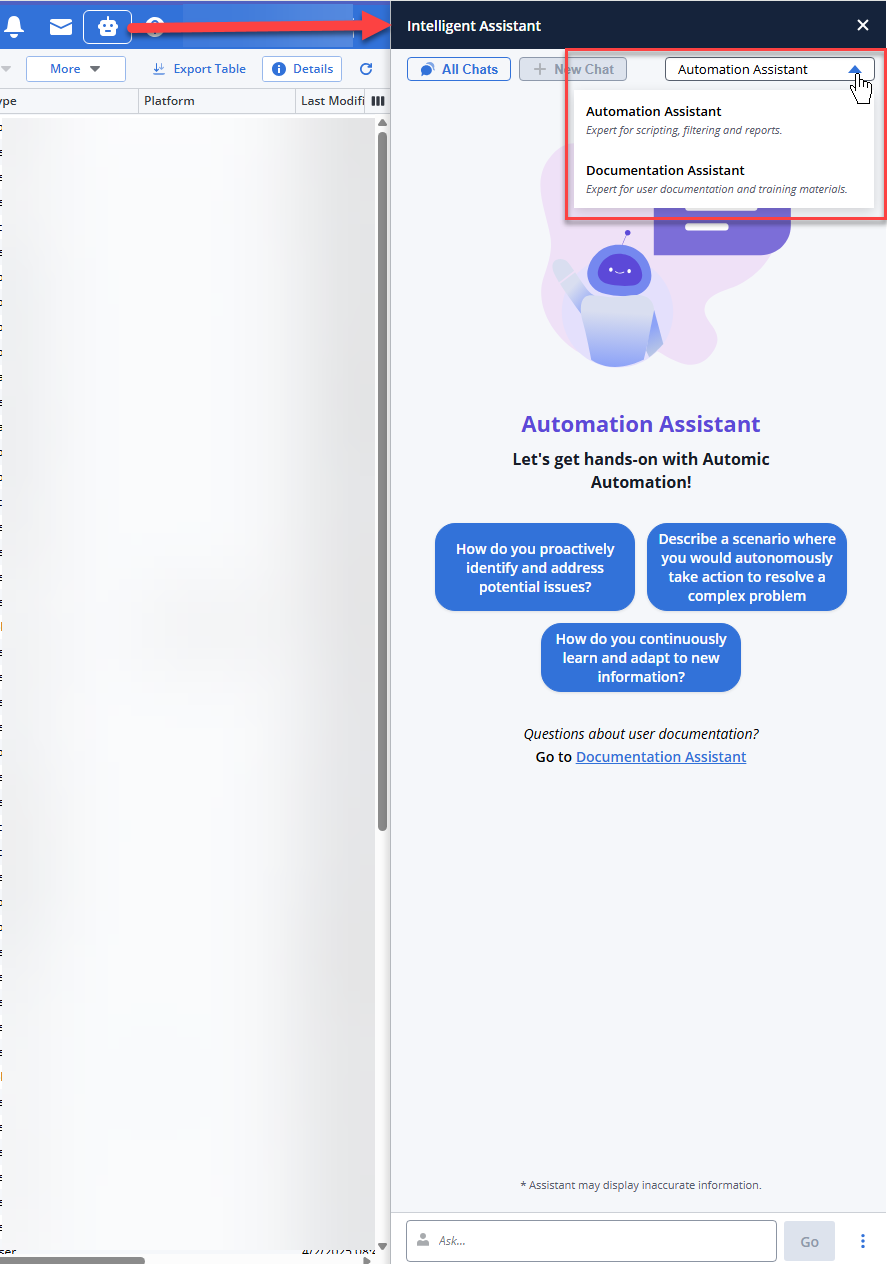
The panel gives you access to the following new functions:
-
All Chats
Opens the Conversation History, where all your questions and answers are displayed. It contains all the conversations available in a session.
-
New
Puts the focus in the Ask field at the bottom of the panel, where you can enter your next question.
-
Automation Assistant/Documentation Assistant dropdown list
Lets you select the Agent you want to answer your questions depending on their nature.
-
The Automation Assistant, your automation expert.
-
The Documentation Assistant, your product documentation expert. A beta version of this powerful assistant was introduced in previous versions and it is enhanced now.
-
-
Predefined prompts that are context-sensitive. This means that depending on the AWI area from which you have opened the assistant, the suggested prompts change. For example, if you open it from the list of Users in the Administration perspective, the suggested prompts are Which users are locked?, Show only active users, Sort users by name descending. If you open it from the list of tasks in the Process Monitoring perspective, the prompts are Show blocked workflows, Show aborted tasks from last night, Show tasks waiting for agents, and so forth.
-
Ask input field at the bottom, where you can have your conversation in natural language about all things automation with the Intelligent Assistant. The three dots beside the Go button open a menu where you can also open a new chat, access all already available chats and close the assistant.
-
Statistics about token consumption. A pie chart at the bottom of the Assistant panel provides a visual representation of your token usage for every prompt. As soon as a response is generated, the chart updates to show how much of the LLM capacity or your administrative quota was utilized.
For more information see:
Smart Conversations with the Automation Assistant
The Automation Assistant is your dynamic, interactive partner for navigating the Automic Automation environment. This intelligent bot empowers you to simply ask questions and engage in a natural conversation, providing quick access to information and insights about your operations and about your environment. Designed to leverage your LLM, the Automation Assistant delivers relevant and accurate information for your queries.
Should an initial response not fully meet your needs, its true power lies in its conversational nature: you can easily ask follow-up questions, refine your query, or dive deeper into a topic, making it easier than ever to explore and understand your automation landscape.
Here’s how the Automation Assistant transforms your interaction with the AI:
-
Dynamic Filtering and Sorting
The Assistant is aware of the available view and can use natural language to filter, sort, and reset filters based on the current view. You can easily update, set, reset, or remove filters, and sort columns within the view using natural language commands.
-
Seamless Navigation
Even when navigating to a different view with filters, the Automation Assistant intelligently adapts, focusing on the filters relevant to the new view. This ensures a consistent and context-aware experience across different areas of Automic Automation.
-
General Question Answering and Task Execution
The Assistant can answer general questions and even execute tasks via MCP server calls. For example, you can ask the assistant how to restart a Job or even request it to restart a specific task.
Example
Imagine you are an Automic Automation operator and you are working in the Process Monitoring view. You can ask the Automation Assistant to display all failed Jobs. The list of tasks will update accordingly, with the status filter set to Abend. You can then continue the conversation and ask when a specific Job last ran successfully and if there were any recent changes. The assistant will respond with the last successful date and time, as well as details on who made the last changes and when.
For more information, see Understanding the Automation Assistant .
Enhanced Report Analysis
Automic Automation's Gen AI capabilities have been enhanced to provide more accurate and context-aware report analysis. As of this version, the Automation Assistant leverages improvements in how it analyzes reports, delivering better insights and recommendations. Now, it considers the specific object types and their statuses when analyzing reports. This improvement allows the Automation Assistant to provide more relevant, accurate and insightful report analysis.
Benefits
-
More accurate analysis: By considering the object type and its status, the LLM can provide more precise analysis tailored to the specific context of the report.
-
Improved recommendations: The enhanced analysis leads to more relevant and actionable recommendations for resolving errors and optimizing automation processes.
With these enhancements, the Automation Assistant continues to evolve as a powerful tool for simplifying report analysis, identifying root causes, and suggesting effective solutions within Automic Automation.
AI-Powered Filtering and Sorting
Automic Automation introduces a new AI Filter Assistant available from the Automation Assistant that enhances list filtering and sorting capabilities by allowing you to use natural language prompts. The key aspects of this enhancement include:
-
Natural Language Prompts
You can enter prompts in natural language to filter and sort lists. The AI Filter Assistant interprets these prompts to refine the list according to your needs.
-
Filtering Criteria
The AI assistant supports all filtering criteria available for the list.
-
Sorting Options
You can specify the order in which the resulting list is displayed. For example, tasks can be sorted by runID in ascending order or by end time in descending order.
For more information, see:
Watch the video on Broadcom's Education channel on YouTube.
Customizable Prompts
Automic Automation's Gen AI capabilities leverage LLMs to streamline complex automation tasks. In their initial release with version 24.4.0, the Analyze Report, Analyze Execution, Analyze Script and Generate Script functions operated using hard-coded, "behind-the-scenes" prompts. Because these original prompts were not fine-tuned for specific LLMs or specialized use cases, the output could occasionally lack the 100% accuracy required for mission-critical automation.
With this version, Automic Automation introduces a significant upgrade by handing control over to the administrator. You can now move beyond "one-size-fits-all" AI responses by fine-tuning the prompts to match your specific environment and the unique nuances of your chosen LLM.
The UC_AI_PROMPTS VARA Object
A new system-wide STATIC VARA object, UC_AI_PROMPTS, is now available in Client 0. This object stores the LLM query strings used across the platform. Administrators can modify the prompts to improve accuracy and relevance based on real-world feedback and specific LLM behavior.
The VARA contains specific keys allowing you to tailor prompts for:
-
Report and Execution Analysis
-
Script Analysis
-
Script Generation
The prompts are loaded automatically upon user login. This object is part of the initial data and is automatically updated during system upgrades. Even if Object Access Control Lists (OACLs) are active, read access is maintained to ensure the Automation Assistant functions without interruption.
This enhancement means that your company can now tailor the prompts to best fit your operational needs and LLM capabilities, leading to better results from your LLMs. This advancement directly supports Broadcom's commitment to expanding Automic Automation's AI feature set, making it increasingly adaptable and intelligent with each release.
Benefits and Improvements
-
Enhanced LLM Performance
Different LLMs perform optimally with specific prompts. Now, you can tailor the prompts to match your LLM, maximizing its effectiveness.
-
Flexibility
You can adjust the prompts to have the LLM answer in a different language.
-
Centralized Prompt Management
All LLM prompts are stored in a static VARA object in Client 0, making them easy to manage.
-
Accessibility
Read access to the VARA is possible even with OACLs set.
-
Seamless Updates
The content of the static VARA can be automatically updated during AE updates or upgrades.
For more information, see UC_AI_PROMPTS - Customizing AI Prompts. For an overview of Automic Automation's Gen AI capabilities, see Automic Automation's Generative AI Capabilities.
New AI-Related Script Functions and Parameters
Providing Context to ASK_AI: BEGIN_AI_CHAT and END_AI_CHAT
Automic Automation version 26 introduces new AI scripting functions that let you define and control conversational LLM contexts directly in your scripts. These enhancements make it easier to orchestrate multiple related ASK_AI calls using natural, chat-style interactions with your Large Language Model.
The new BEGIN_AI_CHAT and END_AI_CHAT script functions allow you to open and close a dedicated AI chat context that you can reuse across one or more ASK_AI calls. This gives your automation a persistent conversational memory so that subsequent prompts can build on previous exchanges instead of starting from scratch each time.
For more information, see BEGIN_AI_CHAT... END_AI_CHAT.
New LLM Context Definition for ASK_AI Function Calls
Version 26 adds the ChatID parameter to the existing ASK_AI function, allowing you to specify an LLM context created via BEGIN_AI_CHAT. Pass the chat ID returned by BEGIN_AI_CHAT to keep the conversation history alive, so AI responses build on prior exchanges for more accurate, context-aware results.
Scripts using ASK_AI without ChatID continue to work unchanged, using stateless prompts as before. Add ChatID selectively to upgrade any Workflow to conversational AI, such as dynamic error handling or iterative code generation, without refactoring existing logic.
For more information, see ASK_AI.
Enhancements to the Automation.AI Component
Automation.AI operates as a standalone application within the broader Automic Automation package. It relies on its own dedicated REST API to facilitate communication between the Automation Engine and Automation.AI.
Important! The Automation.AI REST API currently does not require authentication. To prevent unauthorized access, it is strongly recommended to deploy Automation.AI strictly behind a firewall or within an isolated, secure internal network.
The version of the Automation.AI component delivered with this version of Automic Automation introduces the enhancements listed below. For detailed information on the configuration of these enhancements, see:
Secure MCP Server Communication with OAuth 2.0 and Basic Authentication
The Automic MCP Server now supports industry-standard OAuth 2.0 authentication, significantly increasing security and permission control when integrating external Open API-based services (such as the AE REST API).
To provide maximum flexibility and secure proxying, the MCP Server authentication is now divided into two distinct configurations:
-
Authentication In: Validates the identity of the client calling the MCP Server. You can now securely enforce OAuth 2.0 by configuring a JSON Web Key Set (JWKS) URL (supporting providers like Microsoft Entra ID, Okta, and so on) and specifying the required token scopes.
-
Authentication Out: Determines how the MCP Server handles authorization headers before forwarding requests to the remote REST endpoint. You can configure the server to pass the client's original token through, enforce specific token types (such as Bearer or Basic), or inject a securely encrypted, hardcoded Basic authentication header for service account access.
These settings can be applied globally as a baseline or overridden for individual Open API providers.
TLS/SSL for the Automation.AI Component
You can now secure the communication between the Automation.AI and the Automation Engine as well as the communication between the Automation.AI and the AE REST API using TLS/SSL encryption. You can do so for all supported installation types.
Manual and Containerized Installations
In both cases, you need to enable TLS/SSL to secure the communication between the Automation.AI and the Automation Engine as well as the communication between the Automation.AI and the AE REST API and define the relevant parameters, depending on which certificate you want to use. You have the option of using either PEM certificates or a Java Keystore.
Important! Make sure you have all required certificates in place. For more information about using certificates and TLS/SSL in Automic Automation, see TLS/SSL Considerations for Automic Automation and TLS/SSL Communication and Encryption.
You need to define the relevant parameters while preparing to install the Automation.AI component.
ONE Installer
By default, the installer automatically generates and applies trusted certificates and a predefined TLS configuration during installation. You can also configure custom TLS settings by providing your own certificate, private key, and private key password. To support this enhancement, new parameters have been introduced in the .varfile:
-
AUTOMATION_AI_TLS_CERTIFICATE
-
AUTOMATION_AI_TLS_CUSTOM
-
AUTOMATION_AI_TLS_PRIVATE_KEY
-
AUTOMATION_AI_TLS_PRIVATE_KEY_PASSWORD
These parameters allow flexible control over the TLS/SSL configuration and the integration of security requirements specific to your organization. For more information, see ONE Installer - Single-Box Installation.
Automatic Password Encryption
You can now automatically encrypt passwords within the application.properties file for the Automation.AI component. By setting the automation.ai.encryption.enabled parameter to true, the system utilizes a FIPS 140-3 compliant cryptographic pipeline to identify and secure sensitive credentials dynamically, replacing them with encrypted values using a {cipher} prefix.
For more information, see Obfuscating and Encrypting Passwords
New Setup and Configuration Sections
New documentation and configuration categories are now available to provide a more streamlined approach to managing MCP settings and system health diagnostics.
-
New MCP Server Settings
This section allows you to define the core communication parameters for the MCP server. It includes configuration for the server port and the "Authentication In" security settings required to validate incoming requests from clients.
-
New MCP Client Settings
The MCP Client settings define how Automation.AI interacts with remote LLM providers and external services. These parameters manage connection pooling, timeouts, and "Authentication Out" configurations to ensure secure and reliable outgoing requests.
-
New Logging Section
A dedicated logging section is now available to help administrators monitor component health and troubleshoot connectivity. You can configure specific trace levels for different packages and manage log rotation to ensure system performance is maintained.
Additional Component Enhancements
In addition to the core security and authentication updates, this version introduces several functional enhancements designed to improve the performance, scalability, and integration capabilities of the Automation.AI component.
New Parameter to Define Memory Length
Use the automation.ai.chat-memory.messages.max parameter to define the number of messages that the LLM should keep in its memory.
New Automation.AI Database
The data related to the Automation.AI component is now stored in a dedicated PostgreSQL database, ensuring data remains preserved across restarts. This enhancement improves reliability, stability, and transparency.
-
ONE Installer: when using it, the database required for Automation.AI is also created automatically and shares the same database instance that is set up for Analytics.
-
Manual installation: In this case, you need to create and configure the in advance.
-
AAKE: The Install Operator supports flexible database deployment with two modes: a temporary in-cluster database for quick setup or a connection to an external PostgreSQL instance for managed environments.
High Availability for Automation.AI
The Automation.AI component supports high availability, thus improving resilience and scalability.
In Automic Automation Kubernetes Edition, you configure this by setting the replica count using the parameter automationAiReplicas in the values.yaml file while preparing for the installation. In on-premises environments, you install more than one Automation.AI instance.
In both cases, the Automation.AI instances / pods use the same Automation.AI database.
New Supported LLMs: Azure OpenAI and VMware PAIS (Private AI Services)
You can now integrate Azure OpenAI and VMware PAIS as your large language model (LLM) provider.
Automation.AI Uses REST API Endpoints (All REST Operations)
The Automation.AI component is able to connect to the AE REST API which enables Automic Automation's Gen AI capabilities to use its endpoints to dynamically query the Automation Engine for data it would not be able to get from an LLM. Being able to request and receive real-time data results in improved and accurate responses about your Automic Automation system.
For more information, see Enabling the Gen AI Capabilities to Use the AE REST API.
Bearer Token Authorization for Automation.AI Access to the AE REST API
The Automation.AI component uses temporary bearer tokens to securely authorize user access to the AE REST API. These tokens are valid for 24 hours but are automatically deleted immediately upon completion of each AI request. This approach ensures secure, on-demand access to real-time Automation Engine data, enhancing the accuracy and context-awareness of Gen AI responses without compromising system security.
Note: If you prefer not to use bearer tokens for authorization, you can disable their creation by setting the AUTOMATION_AI_USE_USER_CREDENTIALS parameter of the UC_SYSTEM_SETTINGS variable to N, which will prevent token generation and AE REST API access via Gen AI, see AUTOMATION_AI_USE_USER_CREDENTIALS.
New Parameter to Define the HTTP Client Properties
You can use the User-Agent header to specify the value included with all outgoing HTTP requests made by the webclient. This header also supports property placeholders like ${app.version}, for example automation.ai.http.user-agent=Automation-AI/${app.version}.
Note: You need to restart Automation.AI after modifying this parameter.
New System Setting: AUTOMATION_AI_TIMEOUT for REST Requests
You can now control the timeout period for REST requests made to the Automation.AI component.
This new parameter is available in the UC_SYSTEM_SETTINGS and allows administrators to adjust the default 600-second timeout to better accommodate specific network conditions or performance requirements without requiring a system restart.
For more information, see AUTOMATION_AI_TIMEOUT - Configuring the REST Request Timeout for Automation.AI.
See also:
- What's New in Version 26
- What's New in Version 26: General Enhancements
-
What's New in Version 26: General Enhancements for Administrators